
Traditional Data Engineering relies on products such as Airflow, Hadoop, Spark and Spark-based architectures, or similar technologies.
These are still viable solutions for a number of reason, not least the fact that Data Engineers are few and far between, and the vast majority of them will be familiar in the above technologies or similar products/frameworks.
Go Serverless
I wrote an article about our tech stack, which includes S3, Athena, Glue, Quicksight, Kinesis etc.
What is not immediately apparent is the serverless nature of our stack, which was a deliberate choice taken in the context of a Data Analytics department which was started as an experiment and had to pick its battles very wisely. Sysops, cluster / server management, CI/CD were not top of our list. Creating dashboards was.
Also before Teamwork I had a nearly 2-year run working with a company that was entirely serverless in their set up AND mentality, and it was a career-changing experience. We worked prevalently with AWS Lambda when Lambda was a new toy, and we loved it.
Finally, despite the “buzz” over Functional Programming being seemingly over, I am an arduous fanatic of it and of what it represents philosophically, a way to represent each problem in terms of an input, some transformation, an output and when possible, no side effects.
NOTE: some of the tools I mention are not strictly serverless as much as they are fully managed (eg. Kinesis or Github Actions), but they still involve little or no sysops / devops.
Serverless Processing: AWS Lambda
Once upon a time you would have to settle for Node.js or Python to write Lambda code, but nowadays not only you can use a whole lot of runtimes, you can simply use your own docker image et voila’, you’re ready to go. In our case we are ready to Go, since at Teamwork Go(lang) is our programming language of choice. It’s fast, easy to use, very safe and reliable, and given that it can complete the same operation faster than most other programming languages it also translates to a cost save, given Lambda pricing is a function of the duration of the execution of each Lambda invocation.
Serverless Deployment: Github Actions + Terraform
Terraform keeps us aligned with the internal practice for infrastructure maintainance and Github Actions allow us to perform a Terraform apply on PR merge, so effectively we have cut out the need for older setups such as Travis or Jenkins. It does not cut out the reliance on a third party (Github) but we’re ok with the eggs being in that basket because if Github goes down then we can’t even push our code so there would not be releases anyway. Note that we build Docker images and store them in ECR (you have to for Lambdas), but we are happier with this than with having our images on Docker Hub since — again — without AWS our system is down so we’d rather reduce the number of service providers we depend upon.
Serverless Events: AWS EventBridge
One particularly elegant aspect of building serverless pipelines in AWS is EventBridge, which allows several triggers to invoke pipelines, making them event driven. Your Lambdas can be invoked by SNS topics, S3 events and so on. A frequent way we use in Teamwork to invoke Lambdas is to set the s3:putObject as a trigger, so any time an object is added to a particular bucket, a Lambda is invoked that will process that particular object.
Serverless Analytics: Athena
Athena is a great analytics engine whose pricing model is based on the amount of S3 space scanned and — if you use federated queries — the underlying cost of Lambda invocations. Since partitions are of vital importance when querying large datasets, structuring your queries so only subsets of your data are scanned, and making sure you use compressed and optimized columnar formats (such as parquet) means saving cost on queries.
Fully Managed Components: Kinesis and Quicksight
Kinesis covers a vital role in that it holds the streams of data traffic that are meant for processing and storage. Kinesis Firehose in particular does a great job of automatically partitioning your data by time units, down to the hour, into your desired destination. We mostly store in S3 but you can also target Redshift, Elasticsearch and Splunk.
Quicksight is a visualization tool that is extremely powerful. It probably lacks a bit behind competitors such as PowerBI or Tableau in terms of UX, but its seamless integration with AWS makes very interesting features such as augmenting your data with ML predictions with Sagemaker an incredibly trivial task. You can also expose your dashboards to the internet if you are on the correct pricing plan, we use this feature to democratize our data internally by granting access to all our dashboard to all our employees.
Example Use Case and Architecture
The problem at hand was exploring the usage of Teamwork integrations, with a particular focus on the internally maintained ones to prioritize feature development.
The raw data source is HAProxy logs in common log format, and these logs are funnelled into Cloudwatch, and this was our starting point. We designed the architecture from there, here is the diagram:

Step 1: Subscription Filter (Production Account)
The way we extract logs from Cloudwatch is through a little known feature called Subscription Filters. You can have two filters per log group, and all they do is take log entries (you can specify one of several formats available), apply a filter that you can write (regex / parsing kind of thing) and extract the matching entries.
Step 2: Kinesis Firehose (Production)
Subscription Filters can be configured to publish their data on a Kinesis Stream, or a Firehose stream, which is the option we chose to “park” the gzipped entries into a S3 bucket.
Step 3: S3 replication (Production -> DA)
We are replication data out of our production account into our Data Analytics (DA) account. This is good for a multitude of reasons, but mainly:
1. Don’t do Analytics in Production
2. Avoid having to set a lot of policies allowing cross-account interaction between components, which is annoying.
Step 4: Processing (DA)
Processing happens with a Lambda, which is triggered by the s3:putObject event in EventBridge. Whenever a new object lands in the bucket (in this case by means of replication), the Lambda picks it up and processes it.
This step takes the entris that have been transformed into gzipped JSON by Firehose and for each entry, it looks up details of the request so that we can augment the record with account and integration information. We use a Federated Query in Athena to join several data sources, and we store the augmented records in Prophecy, our data lake.
Step 5: Cataloging
Every hour, an AWS Glue Crawler scans the data lake bucket for new data, and it updates schemas in our AwsDataCatalog which is the catalog of metadata information for Prophecy. There the schemas are updated and new partitions detected.
Step 6: Analytics (DA)
At this point the data is ready to be analyzed. Our normal process is to write SQL queries and create an Athena view for them, and so we wrote a single SQL view that retrieves all the data we need to visualize which illustrates integration usage records.
Step 7: Visualization
Finally we create a dataset in Quicksight based on the aforementioned view and display the integration usage, delegating to Quicksight details such as computing distinct accounts / users / number of requests per integration etc.
Conclusion
Data Engineering is evolving just as fast as other fields in the Data realm (Data Analytics and Data Science, for example) and while traditional methods won’t go away any time soon, Serverless Data Engineering means data can be collected, transformed, manipulated and made available to data analysts and data scientists cutting costs on overheads and increase elegance and stability of your pipelines.
The “Go Serverless” Data Engineering Revolution at Teamwork (golang + AWS = ❤) was originally published in Teamwork Engine Room on Medium, where people are continuing the conversation by highlighting and responding to this story.
]]>
Sometimes you need to add an icon to your iOS app, The designer sends you that plain, simple icon. It can be a bitmap-based icon, like a PNG. Problem with those is they get blurry if zoomed in too much. So we can use a vector-based icon, like a Font Icon or a PDF. These are vector based, contains the instructions to draw the icon, not the icon itself. This way you can stretch the icon as much as you want, and you’ll never see “big pixels” in your app.
But what happens when you have a screen capture of your icon, but can’t get any of these options? Well, this means it’s time to dust-off your Core Graphics Skills and draw the icon by yourself. Won’t even mention the horrible alternative of taking a screenshot and cutting the icon. Don’t do it. I’ve done it and it’s, indeed, horrible.
Instead of telling you what Core Graphics is and how it works, we’ll write code to solve a problem, so you can experiment and learn by doing. This is my preferred way of learning a new framework / library / language: try things, read a bit, try more stuff, read more seriously, watch videos, GOTO 1.
The Notebook Icon
The icon we’ll try to recreate is this one:

Represents a notebook with a background color that can change, a darker same color spine and a couple lines to represent the Notebook title.
Create a new Playground
We’ll do all our coding inside a Playground. So we can get instant feedback. In the end, it will look like this:

But for now let’s create a Playground called Icons. It will just have one Playground page. Remove everything inside that page and just add:
We’ll use the first import to draw Views and use Core Graphics (it’s included by UIKit). PlaygroundSupport will help us show nice previews of our work inside the Playground.
Planning our work
Looking at that notebook icon we can see it’s composed of 4 rectangles:
- a big rectangle that forms the Notebook itself
- a spine rectangle
- and a couple rectangles that seems like text written as title and subtitle
So we’ll do exactly that, starting with a view that will be the main notebook icon.
The Notebook Icon View
We’ll start with this:
Putting this in the Playground, we get a white square painted in the preview. What’s happening here?
- we define our NotebookIconView class. Will be a subclass of UIView, so can be easily added to any other UIView in our program.
- then, we create an instance of this class, passing in a CGRect. This is just a rectangle with the dimensions of the NotebookView we want to create.
- finally, we tell the Playground to show us the NotebookIconView:
The view appears White because that’s the default background color of the Playground Support View, and icon2 own backgroundColor is nil, meaning transparent color.
A builder for the icon
We want to pass more information while we create our icon. We need to pass in a CGRect to set the size and a colour. And we'll have to adjust the corner radius (to make this rectangle corner's rounded). We'll use a static factory method:
Now we can create another icon and show it in the preview:
Progress! We now have a view with desired background color and round corners!

Notebook Spine
Up until now we’ve created a view, changed its color and round corners. Now it’s time to draw inside that view. To do that we’ll overwrite UIView:draw(_ rect: CGRect).
Also, we’ll add some constants to get correct proportions of all rectangles. If we set the spine’s width to, say 40 points, it will look great with a Notebook icon 200x200 points in size, but too small for a 2000x2000 icon. So it’s better to use a proportional factor.
Let’s add this code inside NotebookIconView, just after our build method:

Thanks to the clipToBounds property, although we're drawing a regular rectangle, it get's clipped and we just see the external rounded corners of our main view, but we can see it's a regular rectangle after all just by looking at then internal corners of that rectangle. If you want to really see that rectangle, change this line to:
Finishing touches
Now we need to add the two “Title lines”. Again, two more rectangles. Let’s add this to our draw method:
Also, we’re using this small function to draw rounded rectangles easily:
Here we use a path, which is a closed sequence of points. Remembers those drawings you can do just joining points with lines? A path is just that. We define a path using a rectangle, set a cornerRadius so the borders are rounded and fill the area inside that path with a color.
This is our final result. You can make taller, wider, etc. Experiment with it!

Improvements
We are using a fixed corner radius (15), that can look good if you’re using a small icon, but not so great with a bigger one. If you like this article and say Hello in twitter, we’ll add that and also create a new icon for different file types, with text, color, etc. Something like:

Just copy this code inside a playground and start experimenting. It’s the best way to learn something!
Drawing icons using Core Graphics was originally published in Teamwork Engine Room on Medium, where people are continuing the conversation by highlighting and responding to this story.
]]>
Fast track the review process with these steps!
At Teamwork, we know that integrations between the products you use most are essential to speeding up workflows and saving you time on switching between multiple apps. So when we released the Teamwork Developer Portal earlier this year, we were really excited to finally unleash the power of API driven solutions, and give you a dedicated space to build custom workflows with the tools you use everyday.
Why build with us?
Building an app to enhance the capabilities of Teamwork not only allows you to unleash the power behind automated processes, but it gives you access to our growing customer ecosystem. Did you know we have 20,000 + customers?
Right now, we have a suite of 5 products, all with their own integrations to offer a seamless experience within our suite. With the ability to create your own apps, you have the opportunity to expand our suite, and grow with us. Whether you are trying to tackle an internal business process issue, or promote your company through integrations listings, we will support your development.
So if you’re interested in building an integration with Teamwork and would like to get listed in our integrations directory, then keep reading.
Firstly, your app must be created in the Developer Portal — you can learn more about how to get started here.
When your app is ready to go, it’s time to get it verified by Teamwork by reaching out to us at [email protected]. For this step, it’s essential that you provide us with a way to test your app.
Since launching the Developer Portal, I’ve come across some common missing items in applications. So to speed up this process, I’ve outlined a checklist of everything you need to get a quick approval and listed on our integrations directory in no time.
Let’s get started!
Verification Checklist
1. App Sanity Checklist
It’s important that we check some app details in the Developer Portal:
- Name and description must be clear and honest
- Icon must be clear and visible
- At least one product scope must be listed, but no more than is necessary. For example, if your app creates tasks, no need to have Teamwork CRM as a product scope. It’s safer for our users to use only the scope(s) you need. You can change this later and it’s no trouble — the consent screen will show for any new scopes
- Redirect URI must be entered, but no more than necessary, https only
2. OAuth must be implemented
It’s important that you use the credentials from the Developer Portal for authentication, we require all apps to use our App Login Flow. In order to successfully implement this, you need to pass in the client_id and client_secret along with redirect_uri.
3. Check for your consent screen
It’s important that when testing your app, you consent the app to use your data. Consent screens look like this:

To test this, simply add a new user to your Teamwork site, or sign in with an existing user that has never logged into your app or used it before. A new user signing into a 3rd party app will always get a consent screen the first time they log in. Once they consent to the app, the consent screen for that user won’t bother them again unless you change the scope of the app. In that case, the user will need to give consent for the new scope.
Why isn’t my consent screen showing?
Are you certain you are logging in with a new user ? If the user has granted consent to the app previously, the consent screen won’t be shown again.
Why does my consent screen show a random string instead of my app name?
This is a very common occurrence, and the reason is:
- You are not sending the redirect_uri and client_id correctly. Ensure to check that it’s in your first call to launchpad/login?client_id=XXX&redirect_uri=YYY, and in your payload to token.json.
4. There is no impact to the Teamwork data on initial sign up or import
Your app should enhance the user’s experience. When they log in, they should not be met with drastic changes to their Teamwork account.
5. Certain API functionality is present
The most common issues we find with 3rd party apps when it comes to using our API is:
- API Implementation for paging requests: Lots of 3rd party apps don’t include paging on their API requests the first time around. It’s easy to implement, and you can find our paging under each of our API hubs: Teamwork, Teamwork CRM, Teamwork Desk, Teamwork Spaces
- API Implementation for rate limiting: OK, we had to add in rate limiting to keep you from hammering our poor servers. So if we receive more than 150 requests per minute, we will send you to the sin bin. ie. you will receive a HTTP 429 Error code in response. The status text returned will be “You have exceeded your rate limit. Please try again in a little while.” After 60 seconds, we’ll let you back in!
- We check for large imports: if your app requires an initial import of Teamwork data. Our testers when verifying your app will check a data-set that is large which would have more data than many single paged requests. Why? To catch two things, the paging & rate limiting, but also to ensure the doesn’t crash and the requests were closed out in an efficient way.
6. User permissions testing
This is super important to us! Our privacy features are used by many of our users and ensuring our 3rd party apps respect that privacy is key. Depending on the app, we will check that permissions based tests are carried out.
For example, with Marker.io, their app allows creation of tasks in Teamwork from their app. When testing this, we looked for features like:
- The projects rendered in the 3rd party app are the same as in Teamwork
- We turned off the ability to create tasks for a user and test the permission is handled in app respectively
- On tasks returned, we ensure tasks marked as private don’t appear
It’s important to note that any behaviour on the 3rd party app must match our web app, if you are making assumptions about privacy settings, or admin settings, the user must be notified. Any assumptions regarding permissions must be clearly documented and explained to the customer. For example, when adding a user to a project in order to assign them to a task, it must be clear to the user that they’re adding this person to the overall project as part of this step. For example, you want to assign a task to me, Holly, but I’m not in project Website Redesign. In order to add a task for me, it involves adding me to the project first. We need to ensure the user is aware of the change they are making, with a simple notification to say “You are adding Holly to this project by assigning this task”.
Finally, The app should enhance the Teamwork experience
The app should work alongside Teamwork to enhance the user experience in both products. The app should be an integration and any actions should involve some interaction with Teamwork.
Have you ticked all those boxes?
If you’ve covered off each item on the checklist above then it’s time to reach out us at [email protected] with the following information:
- A detailed overview of the app: Explain exactly what the app does, in as much detail as possible
- Help docs on how to access the test app and how to use the integration: Our team needs them to get testing and verify the app as fast as possible
- A test account of your app: so we can access the integration inside your software
More often that not, apps don’t get verified first time around because of simple issues, such as:
- Not being able to log in
- Not having paging or permissions based API requirements
- Importing projects or tasks crashing
- No consent screen
- No help docs or test account provided
If we don’t encounter any issues, and all of the above information is included, then that’s it! We will mark your app as verified and you will see the tag in the Developer Portal change from “In Development” to “Published”.

If you are interested in listing your app? take a look below…
App Listing
Let’s take a deep dive into the content you need to provide once your app is verified. You’ll be notified once the app is verified by Teamwork .
1. Public help docs explaining how to enable the integration and how to use it
Help docs are one of the most important resources you can give us, and this can be provided as early as the first point of contact. While this seems similar to the point above, the help docs above will need to be polished for our customers. We will send these to our technical writers for review and list them under our help doc sites — similar to our Marker.io help docs.
2. Dedicated landing page for your new Teamwork App
A dedicated landing page for your new Teamwork app is required. This will be used to link your app to our integrations directory. Take a look at some of our partner landing pages as a place to start. The likes of Marker.io and Numerics are great examples!
3. Provide a short description and logo
You’ll need to provide a short description and a high resolution logo in order to be listed on our integrations directory. Your app will be listed on our integrations listings here. Here’s an example:

Our integrations directory is a growing collection of apps which showcase the work of Teamwork developers and integration partners. We pride ourselves in knowing that our platform is being transformed with new and innovative apps that help people work together beautifully and be more efficient day to day — and that’s why we take this process seriously.
I hope this helps you in getting an app approved on the first request. If you have any questions, please don’t hesitate to reach out to [email protected].
Building an app with the Teamwork Developer Portal? was originally published in Teamwork Engine Room on Medium, where people are continuing the conversation by highlighting and responding to this story.
]]>You need a Data Lake.

The Context
Teamwork has been around for more than 10 years. Starting out as a project management and work collaboration platform and later expanding into other areas, such as help-desk, chat, document management and CRM software. As the company has grown and evolved, data has grown, changed, expanded, diversified, fragmented, then changed again. Analytics in this landscape are not for the faint of heart.
The Problem
The issue at the base of the decision to start re-evaluating our analytics approach, at Teamwork, was because we have way too many data sources to make sense of all the data we collect. Much of the data ends up being “dark”, underutilized, unleveraged. We have multiple databases shards, for each product, along with platform databases containing global customer information; and then we have 3rd parties such as Stripe, Marketo, Chart Mogul and Google Analytics to name the most important ones. We realized that making a connection between sales leads in Marketo, their usage of our products (GA and our DBs) and their revenue (our DBs, Stripe, Chart Mogul) was impossible. Well, it was possible, but incredibly painful and poorly automated, making it slow and error prone.
And by addressing this problem we are getting a large number of benefits back, practically for free.
You need Analytics
Let’s cut to the chase: you need analytics. No matter how big or small your business or enterprise is, you need analytics to take more informed business decisions. I do not doubt there are individuals with great gut-driven decision-making skills, but by and large, it’s better if you look at data to make decisions. That’s why you need a Data Lake. It could be a really small lake, it could be a pond or a puddle. But you need it for better decision making.
Data Lakes, Big Data and other buzzwords
Let’s clear the air on a couple of misconceptions. The terms “Big Data” and “Data Lake” absolutely scream of corporate, of enterprise, of governance, compliance, regulations and everything else that any passionate engineer out there probably wants to stay well away from. At least I do. Big Data does not mean “so much data your puny mind cannot possibly fathom” and Data Lake does not mean “so much unstructured data your unfathomable-Big-Data puny mind cannot possibly comprehend”. Yes, volume is one aspect of it, and variety is another (for the lovers of the 3/5/7 Vs of Big Data) but to me, Big Data Engineering is the enabler of Analytics, the size of the data in my mind has very little to do with it. The variety and velocity much more. But really if you find yourself with 1 database table, a bunch of CSV, XML and JSON files and some server logs you’re already knee deep into a big data situation not matter how little your data set is. And the most effective way to analyze all of the above is through classic Big Data Engineering tools / methodologies. To explain this concept further I did a demo for our folks at Teamwork in which I analysed a spreadsheet that only contained about 22k rows of information utilising a (Big) Data processing pipeline.
Enter Prophecy
Our vision for our Data Lake is that it will give us a clear picture of the past (BI) and hopefully predict the future (predictive analytics). Hence why we codenamed the project “Prophecy”.

How we treat Prophecy data
From the get-go, the mantra was absolutely clear. Automate-all-the-things. When you deal with the amount of data that we can potentially generate at Teamwork, there is no choice but for Prophecy to become a self-maintained entity that takes care of ingesting data, cleaning it, extracting the interesting parts and running analytics on those. At Teamwork we are AWS-based, so our tools are AWS tools, but don’t stop reading at this point. AWS tools very often wrap other software (eg. Presto being the engine under the hood of Athena), or you could replace one part of our architecture with an equivalent software that performs the same function (eg. Kinesis and MSK can be replaced with Kafka, EMR with Hadoop).
We haven’t gone as far as automating the provisioning of the entire stack (yet), but Terraform-ing everything is on the roadmap.
Data Storage
S3. Plain as that. Yes, data might end up in Redshift or Elasticsearch for some specific analytics jobs, but first all the raw data is parked and stored into s3. For an AWS-based solution there is really no alternative and by the way, as simple as S3 is, it is a great piece of software, and we’ll see what not-so-well-known features can be really helpful in future posts.
Data Sources
So what are the tributaries of Prophecy? there are 4 at the moment:
- DMS (Database Migration Service): we replicate our DBs into S3 turning them into CSV files. A DMS task operates an initial load and subsequently captures all the changes and stores those in s3 as well. Now the history of every record in your db is stored and kept forever. Free benefit: AUDIT!
On a technical level, DMS captures changes by “pretending” to be a replication node by listening to the binlog of the RDS MariaDB instance we have in place, and translates those changes into CSV, pre-pending a column to the row that indicates whether the new record was an Insert (I), Update (U) or a Delete (D). Really nice to have a snapshot of when a record was deleted. - Kinesis Firehose: we have multiple services publishing to Firehose, which in turn deliver to S3. Note that if you want to use Firehose to deliver to Redshift or Elasticsearch the data will be parked in S3, as an intermediary step, so you might as well just deliver to S3 and only worry about other analytics engines later. Kinesis Firehose delivery streams actually use Kinesis Data Streams as source, upon which data is published by a few services that are capturing Teamwork events coming from RabbitMQ. We could have opted for the RabbitMQ consumers, to publish straight on Firehose, but we’d have given up the opportunity to have Kinesis Analytics streams in place, which generate reports/stats that go to feed the lake. Our usage of Kinesis itself deserves a post of its own.
- AppFlow: this is a very recent addition to the AWS toolset, it allows scheduled import from 3rd parties such as Marketo or Google Analytics or Datadog to be imported into s3. Very handy.
- Prophecy itself: by running Athena queries from Lambda, or by running ETL jobs, more data is generated and stored into S3.
Since storing every single bit of data in our DB would be overkill, we are using a consumer service that listens to RabbitMQ events, and publishes these on Kinesis Data Streams. Firehose streams, utilizing these Data Streams as sources , pick up the events and deliver them to S3. This way we have control over what we really need for analytics purposes and we can do some manipulation before storing the data, reducing the need for ETL / cleanup jobs.
Cataloging
Cataloging the data is important to automate the tasks of creating metadata which is late used by query engines to run analytics. This might seem like a secondary aspect but — on the contrary — it is a vital, crucial aspect of maintaining a big data pipeline.
On the security and permissions side of things you can use Lake Formation, which allows you to restrict access and privileges to users.
The main tool for cataloging is AWS Glue and Glue Crawlers in particular are the backbone of automated cataloging of our data. In short Crawlers scan your s3 buckets, detect structure in your data and infer data types. The output is a table definition for Athena, our query engine of choice. Once cataloged, the schema can be edited so that you can rename columns/fields/partitions or change data types.
Crawlers can be run on demand, or on a schedule. I personally have a nightly run of the crawlers on the s3 buckets, hosting our internal DBs data, because schema changes are infrequent. The crawler for Stripe data is purely on demand, as the Stripe API practically never changes (Should Stripe notify developers of such a change, I would run the crawler again).
Lastly the most impressive feature of crawlers is the automatic detection of partitions. Since s3 uses prefixes (which represent folders but they are not actually folders), Athena tables can be configured to be partitioned so that only the files with the relevant prefix will be queried, and not the entire bucket indiscriminately. The default way of partitioning data of AWS tools follows the standard of prefixing your files with a YYYY/MM/DD/HH prefix, and Glue Crawlers will automatically detect that. If you have an “orders” table in Athena that has structure id bigint | sku string | quantity int | created timestamp the fastest way to query orders place on July 13th 2020 would be to do something like SELECT * FROM orders WHERE YEAR = '2020' AND MONTH = '07' AND DAY = '13' rather than doing a date comparison on the created field. It’s weird because YEAR, MONTH, DAY, and HOUR are not specified fields of the orders table, they are partitions fields, but this is great part of the power of Athena*.
*thanks Aodh O’Mahony for revealing that fact to me.
In short, data arrives into S3 and Crawlers wake up every night to perform their routine scans, keeping the data lake up to date with changes in schemas. They are our vampiric minions, at midnight they awake, at dawn they sleep.
Glue can also run ETL jobs, but that’s such an extensive topic I will write a separate post about that.
Querying pt I — JOINinig varied data
We query our data with Athena. As mentioned, we catered for scenarios in which we might use ingest nodes to load data into Elasticsearch from S3, or the COPY command to load it into Redshift for specific types of analysis, but other than that, Athena is how we query our data. Athena utilizes Presto under the hood, and SQL for queries. There are a few diversion from standard SQL especially for specific functions, but by and large if you are versed in SQL you can use Athena right away. The real difference is in how you create/define tables. In Athena you need to specify the location of your data, namely the S3 bucket where your raw data resides, and you can provide parsing options to correctly interpret the underlying data, so that Athena knows whether to parse JSON or CSV in a particular table. It is highly recommended that you use Crawlers for your table creations as they will specify a “classification” attribute for your table, something that is of vital importance if you want to run AWS Glue ETL jobs, to convert from one format to another for example, or to extract and manipulate some columns into a cleaner and smaller file.
Once the tables are defined you can join them as normal. This might not appear to be a big deal at this point, but it is. For example, Stripe data flows into Prophecy as 6–7 levels deep nested JSON, and global DB information as plain CSV files. Once the crawlers have finished their job, I can — in Athena — create a query that will join the Stripe data table with our global customers table, which under the hood means JSON data is being joined to CSV data, and that is pretty impressive.
Querying pt II — Views
If the above wasn’t impressive enough, with Athena you can create views which will produce subsets of data more suited to your use-cases. For example, I have many *_current views which represent the current state of a record, theoretically mirroring what is currently stored in our live DBs. If you think about it, every record transferred with DMS contains its history as well, so querying for a customer ID won’t return one record but as many records as there were changes to that customer record in the lake. However, more often than not I will want the current state of affairs rather than the entire history. So I create a view which includes a RANK() or a ROW_NUMBER() clause that will only return the most recently updated version of the record. These views are especially useful for visualization in Quicksight.
Visualizing — Quicksight
Visualization is done with Quicksight. This is an excellent product by AWS which allows to create graphs in seconds. If you understand your data and the insights you want to generate then you can create graphs and charts quicker than it takes to describe them. Quicksight can do all sorts of things, its strength is really in a good amount of ML/AI applied under the hood that simplifies a lot of the work for you and gives you predictive analytics out of the box.
In the pipeline
I’m currently working on EMR / Zeppelin notebooks as the next step in terms of processing, and Sagemaker functions (callable from Athena) as the next step in the realm of analytics. When these are ready I will possibly post an overview of how we employed them.
This is just scratching the surface
Each of the components of Teamwork’s Big Data pipeline deserves a post of its own. Hopefully this post illustrates what technologies can be used to set up a Data Lake and Analytics pipeline that’s entirely AWS based. In the future I will dive more deeply into the single technologies we currently use.
Prophecy: Teamwork’s Data Lake was originally published in Teamwork Engine Room on Medium, where people are continuing the conversation by highlighting and responding to this story.
]]>
We’re going to talk about a common request when working with relational data in Vuex. Why and how to cache method-style getter invocations, though the principles would also apply to method-style computed properties.
If you have been following recent Vue v3 RFCs, you might have come across the Advanced Reactivity API, which comes as a very welcome direction for Vue to take. This article is written using Vue v2, but ultimately the code will be simplified if this RFC is implemented.
Firstly, although both property-style and method-style getters offer caching as part of core Vuex functionality, method-style getter invocations do not cache results. If that doesn’t make much sense, keep reading, it should become clear.
What is a Method-style Getter?
Below is the example from the Vuex documentation of a method-style getter, sometimes referred to as a parameterized getter.
getTodoById: (state) => (id) => {
  return state.todos.find(todo => todo.id === id)
}
Normally a getter works by processing state into a given result.
todoCount: (state) => state.todos.length,
This will mean that store.getters.todoCount might provide the value 12, which will be cached in the event that the value is accessed again without any underlying reactive data changing.
isTodoOpen: (state) => (id) =>
  !!state.todos[id].assignee &&
  state.todos[id].status !== 'complete’,
The above example can be accessed by store.getters.isTodoOpen(123) which will return a boolean. This value is not cached, calling it repeatedly will result in multiple executions.
So what is cached here?
Nothing from a reactive standpoint. When the getter property is accessed on the store, store.getters.isTodoOpen, just prior to invocation, this will run the outer function which will not access any reactive data, but create a function, an arrow which accepts id. This created function is now cached.
Why aren’t the results of these getters cached?
There are lots of good reasons not to cache the results of these functions. How many times would you expect them to be called? Will the cache grow very big? How should the cache key be calculated? When should the cache be invalidated?
There are a lot of broad questions with no concrete answers, and there is a danger the functionality would be used without proper knowledge of the impact that poor caching could have on performance.
Ultimately, for anyone who thinks they would benefit from caching these results, it is important you measure the performance of the cache.
Maybe there isn’t a one-size-fits-all solution, which is why the mechanics are explained below and if you need something different, you should be able to put it together yourself.
Our Use Case
At Teamwork, we have a suite of products that are based on frequently changing, highly relational data. Our flagship product is a project management tool, and we have a system with a lot of entities, with a lot of data and a lot of relationships.
You might be querying your backend for a denormalized view on your data closely coupled with the current view in the browser.
There are however benefits to treating your Vuex store as an extension of your database, where normalized data is kept. Where each module might match a database table and use of keys is widespread just like in a database, see this article on module structure for an introduction to the concept. In this case, getters can take on the role of the database view. The denormalized, use case specific, query which relies on underlying normalized data.
Getters might be used to filter, merge, enrich or map data.
Worth calling out at this point, that this means creating new arrays or new objects as getters don’t, and shouldn’t, mutate state.
Now that we have clarified that and hopefully not gone off on too much of a tangent, let’s look at some code.
Mapped Collection render
Below is a render of 3 tasks, each task is a record in the store which has a getter to 'map' it, the example is contrived but the principal is the same. Each mapped record is passed to a component responsible for rendering it (JSFiddle link).
Each component render includes a timestamp and a short time after render, a field on one record is changed.
Before the explanation, keep in mind this example is for illustration and although it could be refactored to remove the flaw, there are real world scenarios that cannot.
The important thing to notice is that when the field on a single record is changed, all 3 record components update! But why?
Is it due to some kind of over-reactivity? No, though the behaviour does look that way. What is happening is that …
- The record change triggers the parent component to re-render …
- … which means that all the getters are called again.
- Because they are not cached they will re-run and therefore created new objects …
- … which will not be strictly equal to the previous objects …
- … therefore trigger each record component to re-render.
Obviously the cost is negligible in the example, but in the real world, these kinds of inefficiencies don’t go unnoticed.
With some rudimentary caching
Let’s take the above example and add in some simplistic caching.
Above is a new method-style getter which maintains a cache (above the invocation scope), each invocation of the getter will check the cache based on a key and either return the cached value or re-run the original getter. This caching wouldn’t be recommended as it doesn’t leverage reactivity at all, but it will prove the benefit caching can give.
Below is the first snippet with the getter added (link to JSFiddle).
Note that the re-render does not trigger all the record components to re-render, just the one that was changed.
The right caching solution
The above code is far too simplistic, it isn’t reactive and it is missing cleanup code. Here is another solution:
Before explaining how it works, how should it be used? As follows:
const { plugin, cache } = methodGetterCacher();
...
plugins: [plugin],
...
getters: {
  mappedTask: cache((state) => (id) => ({
    name: state.tasks[id].name.toUpperCase(),
  })),
},
Without the proposed API, using this code requires access to the store, hence the need for a plugin. An ugly nuisance, but it will only be necessary once.
The outer getter function is then passed to the utility and a new cached function is returned, this is a clean interface.
Let’s look at the just the wrapping code for a second…
[A] const methodStyleCache = (getVM, getter) => {
  ...
  [B] return (...args) => {
    ...
    [C] const innerMethod = getter.call(null, ...args);

    [D] return (id) => {
      ...
      watcher = computed(getVM(), () => innerMethod(id));
      ...
      return watcher.lazyValue();
    };
  };
};
What is happening here is that we take the input getter function [A] which has an outer and inner function, we create a new outer function [B], we then run the outer function [A] to get the inner function [C], and then create a new inner function [D], which will execute the input function [C]. In a nutshell, we are wrapping both the outer and inner functions.
Advanced API Polyfill
This solution has a computed function which aims to replicate computed functionality within Vue, which is the foundation for the way getters work within the store. This function in theory would be deprecated by the new API.
Essentially this is creating a getter for each inner function ID. We need to do this because accessing the getter value from “cache” should still pass dependencies from the inner getter to the calling code. If this doesn’t make sense, this article on debugging reactivity should shed some light on it, but feel free to continue without deep diving.
A downside to this solution is that it relies on unpublished access to Vue. As always, this interface cannot be guaranteed in future Vue versions. However, even if the new v3 API is abandoned, and furthermore this interface no longer available (a very unlikely scenario). This feature is for performance gain, if it were lost, the functionality of the application would not be broken. It has already been confirmed that v3 comes with significant performance improvements, so it may even be the case this functionality is no longer needed.
Regardless, the option is there to copy the Watcher unit tests from Vue into your own codebase (observer/watcher.spec.js), therefore ensuring that if a newer version comes along which breaks this interface, tests will fail and identify the problem in development rather than production.
Measure it
Here is a JSFiddle with the above code in action, but I have also added simple counters for cache hits and misses which get logged to the console. This way the cache performance can be evaluated.
Further possibilities
As mentioned at the start, this functionality can be applied to computed properties with some tweaking also, and if you want to delve deeper and are interested in applying the cache with a limited size, take a look at this gist.
Even if you aren’t ready to use this functionality now, I hope it has been an interesting read, and like me, you are keen to see the Advanced Reactivity API arrive in Vue.
Vue.js Advanced Reactivity API and Caching Method-style Getters was originally published in Teamwork Engine Room on Medium, where people are continuing the conversation by highlighting and responding to this story.
]]>
A couple of weeks ago we introduced a new feature in Teamwork Chat called Project Rooms.
Project Rooms are a great way to create dedicated real-time communication channels for specific projects. Our next priority was to take this feature even further.

Embedded Teamwork Chat
Currently Project Rooms can be used inside Teamwork Chat, but our goal was to make them accessible directly in Teamwork Projects. To achieve this, we considered the following two options:
- Decouple only the important bits and pieces from the existing codebase of Teamwork Chat and deliver them as a standalone module.
- Create a brand new solution that follows component based architecture which could potentially be the future core codebase for the next generation of Teamwork Chat.
After looking into this for a while, we decided that the second option will let us deliver a better quality solution. Our main concern with decoupling the existing codebase was the fact that we didn’t use a component based architecture in the existing client. Unfortunately at the time of the initial implementation of the app, Knockout.js components weren’t a common choice.
New tech stack
Earlier this year at Teamwork.com we made the decision that all our development teams will start using Vue.js as the main front-end framework. We also started working on creating a new internal build system based on Webpack, which allows us to use the latest front-end tools and makes the development process significantly more productive.
Together with Vue.js we started using Vuex, which is a state management library inspired by Flux architecture. Another big change for us was dropping CoffeeScript and replacing it with the next generation of JavaScript. JavaScript ES2015+ comes with great new features and syntax, but also offers incredible editor support and great ESLint that makes our code more consistent across the team.

Luckily, during the development of an existing Teamwork Chat client we split some parts of the code into Node.js modules and we were able to use them with our new codebase.
Sneak peek
As a result of a few weeks of intensive development, we’ve been able to implement the core functionality of the Teamwork Chat conversation component.

Taking care of performance
Embedded Teamwork Chat will be an addition for Teamwork Projects. We spent a lot of time making sure that we won’t impact its performance.
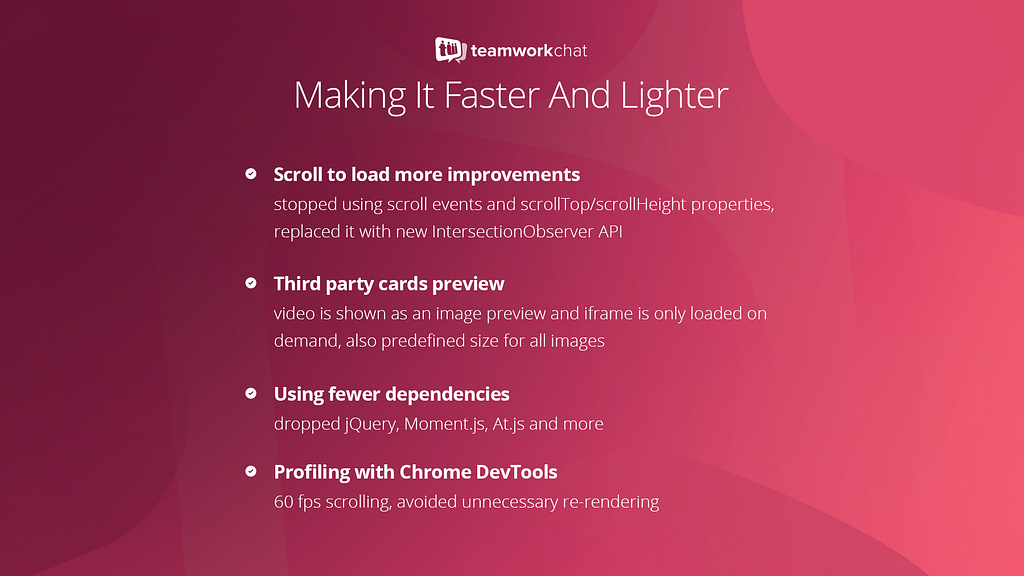
Starting with a brand new codebase allowed us to improve the implementation of particular parts of Teamwork Chat. We were also able to use latest Web APIs which resulting is a significant improvement in app performance, for example thanks to Intersection Observer API our infinite scroll feature is now much better!
Putting all pieces together
Currently, the Teamwork Projects front-end is built with Knockout.js, so we had to find a way to integrate our new code with the existing product.
We decided to make it available as a private Node.js module and we wrapped the entire Vue.js app with the Knockout.js component, so it can be easily included and used inside Teamwork Projects.

Show me the code!
Including embedded Teamwork Chat is just as easy as that:
<chat-project-room params="projectId: 12345"></chat-project-room>
As you can see, we simply follow the Knockout.js components syntax and pass the project ID value, that’s it! Our module will do all the hard work: it will check if the given project has a dedicated Project Room enabled, and if it does, it will bootstrap our Vue.js app inside — voilà!
Combining Vue.js and Knockout.js together
Here you can find the code snippet (simplified version) of our solution for integrating Vue.js and Knockout.js together:
We‘re very excited about Embedded Teamwork Chat and we aim to deliver it by the end of this year!
If you have any questions, leave a comment below.
If you like the sound of working at Teamwork, get in touch — we’re hiring!
Embedding Teamwork Chat was originally published in Teamwork Engine Room on Medium, where people are continuing the conversation by highlighting and responding to this story.
]]>
We’ve recently released an update to the Teamwork Projects webhooks feature and I was asked to do a tech talk on the topic, a recording of which can be found below. This article is a rough summary of the talk with further elaboration of the thought process behind some of our decisions, but in summary:
- We have a microservice written in Go.
- We now support multiple webhooks per-event
- We send full datasets in chosen format (JSON, XML or Form)
- We offer better security and integrity with sha256 checksums
- We have more frequent retry intervals.
What are Webhooks?
The basic idea of webhooks is simple — it’s a HTTP POST call triggered when some event occurs. You can think of it like a JavaScript callback, except it’s a HTTP POST that can be sent anywhere, to anyone — not limited to a single codebase or domain.
In the case of Teamwork Projects, we have a set list of possible events you can subscribe to, denoted in OBJECT.ACTION style, so for example TASK.CREATED or MESSAGE.DELETED.
Previous Approach (v1)
Our original approach was no more complicated than the concept of webhooks itself — when any of the supported actions are taken in Projects, a “fireWebhook” function is called, which checks if they’re enabled and if there is a webhook set up for that event. If all is good — we make a cfhttp call to the relevant URL with the item ID, item type and the action taken, all encoded as form data.
Now there are a few limitations with this approach which showed up as the number of webhook users increased over time:
- Only one webhook per event — although it made sense as a sort of anti-spam measure initially, this resulted in a few inconveniences for our customers. For example, a user sets up a TASK.CREATED webhook that notifies a custom service which adds the task ID to their internal database. This would make it impossible for them to later set up, say a Zapier zap using TASK.CREATED event as it is already “in use”.
- Limited dataset — sending only the event, object ID and user/account ID might be a great way to shave off a few bytes of data, however in most cases such limited information would result in the customers making additional API calls to get the object data.
- Long retry intervals — if a webhook fails, we try it again only an hour later, after 3 total unsuccessful attempts, the webhook is deactivated. This means that if there was a temporary issue with the service, you’d have to wait a whole hour for you notification to come in, you could have hundreds of new events that have successfully gone through in that time and the order can get quite confusing on the receiving end.
Cue Webhooks v2
So the whole idea of a webhooks rework was to resolve these issues, without disturbing the existing implementation, hence webhooks v2. The idea was to trigger a RabbitMQ event alongside when v1 webhooks are to be fired and have a separate service listening to these events and making the relevant HTTP POST calls as needed.
Of course, there is no point reinventing the wheel, so a lot of the code has been “borrowed” from Teamwork Desks webhook implementation, and by “borrowed” I mean I copy-pasted their code base and wrangled it into shape to work with Projects. So out-right their implementation already solved half of our issues and brought extras to the table:
- We are sending a whole data object as part of the webhook payload (with the exception of DELETED events), so in most cases no further API calls are needed. Furthermore we can offer the payload not just in form data but also in JSON and XML formats.
- Failed webhooks are retried 3 times with exponential backoff, so the first retry is after 1 minute, the next is after 5 and the last is 10 minutes later. This is implemented using RabbitMQ queues with different TTLs that send the events to specific dead-letter queues.
- Improved security/integrity — we generate sha256 checksums using user-provided tokens and include them in the headers, meaning they can verify the integrity of the payload on their end.
Aside from the Go service, not many changes were needed on the Projects side. We already had RabbitMQ set up that triggered on all webhook-related events so it was just a matter of sending a few extra headers to get it working.
Now we’re still left with one-webhook-per-event problem, which I first had to resolve on the database side — dropping an extra unique index and then removing the limitation on the Projects ColdFusion codebase. We still have a limit of one-webhook-per-event-per-URL, but that can easily be removed in the future. The great thing about this change is that it does not just affect v2 webhooks, users who are still using v1 webhooks can also make new webhooks for the same event, whichever version they choose.
Lastly, Desk had a nice feature of being able to redeliver a specific webhook delivery and it didn’t feel like the project would be complete if I didn’t implement it in the projects side. Again, this involved triggering a RabbitMQ event marked as a “redelivery” sent off to the retries queue.
In terms of deployment, once again we copied the Desk implementation — once something is pushed or merged to master, Codeship tests are run and if they pass, an image is uploaded to Docker Hub and deployed to Amazon ECS with a new task definition on both EU and US servers. It’s been a smooth process so far, in fact the service was running for 2 months in both regions before v2 webhooks were even released, it’s just no-one (apart from Beta testers) could create v2 webhooks yet.
Possible Improvements & Future Plans
As for the future, there are a few possible improvements/changes:
- Per-project webhooks — an option to only fire a webhook if the event is from within a specific project
- Different payload structures — for example specific formats that 3rd party APIs expect (Microsoft, Google, etc.) as well as API-consistent format once we release a new API version.
- Sending more metadata in AMQP events — we already send some settings like “webhookEnabled” which is cached on the Projects side and saves us an extra query on the Go side, but we could definitely reduce the number of queries and joins in the webhooks service if we more send data like project and installation IDs
- Endpoint-based structure — we could restructure Projects webhooks to be even more like Desk by revolving them around the endpoint URL rather than the event — so the user enters a URL and then chooses the relevant events (and projects). This was the main difference in Projects and Desk implementations, but was skipped due to major changes needed to the database, which would break backwards compatibility with v1 webhooks.
- Deprecation of v1 webhooks — although this will be a slow and gradual process, we will eventually disable v1 webhooks. This will most likely start with any new accounts being limited to v2 and existing accounts only being able to add v2 but still edit v1 webhooks. This will make sure v1 webhooks are phased out smoothly and new users are discouraged from using the legacy option.
Resources
If you have any questions, ask in the comments below or feel free to get in touch via social media. :)
If you like the sound of working at Teamwork, get in touch — we’re hiring.
Monolith to Microservice: Architecture Behind V2 Webhooks was originally published in Teamwork Engine Room on Medium, where people are continuing the conversation by highlighting and responding to this story.
]]>
You may have heard our big news! We recently moved into some new digs! We’ve got big plans for Teamwork.com and big plans require lots of people to make them happen.
In time we’ll need more space, but it’ll be a while before we’re calling the slide manufacturers again. We like to be prepared though, so we held onto our old office space and have decided to put it to good use!
We’d like to take this opportunity to tell you about our new little venture called Teamwork Catalyst — a SaaS incubator for early-stage startups.
We want to encourage businesses to grow, so we’re offering this unused office space to SaaS startups. This means that they will have access to an office with free rent,Wi-Fi, coffee and snacks. Not only that, but Peter and Daniel, the two founders of Teamwork.com, will meet with the businesses in the incubator once a month and offer mentorship if needed.
There is no catch. All that we ask is that you do your best work and get your business of the ground.
Move In, Get to Work!
This initiative started for a number of reasons. First of all, we know the pressures of being early stage startup, and it’s no joke! We worked double-time to keep food on the table while we pursued our dream. We’re hoping that with a little support with business mentoring and basic overhead costs, other entrepreneurs can avoid the same trap.
Secondly, we want to encourage people to start their own business. Cork is a great place to have a start-up, and we want to help the burgeoning tech community thrive here. Since we had some office space empty anyway, this felt like the right thing to do.
We’ve had great interest, and we’ve already have some very promising companies using the space. We can’t wait to see them flourish. Here’s a proper introduction:
Backify: Back-end service for developers to enable people to build their MVP faster. Only front-end code must be developed, back-end is supported by Backify.
Gymix: Creating music playlists for gyms, integrating sales commercials to promote gym products.
Pingy: Web design software with a focus on UX. Web designers won’t need any command line anymore.
Platform Avenue: Talent management suite for creation, promotion, & managing applications tool with smart forms, media uploads, video interviewing.
Referral Works: Talent referral platform for recruitment. Helps recruiters to source, validate and pre-assess referred candidates from an employee’s network
by financially incentivising them to provide key insights into candidates. Clever matching algorithm filters and ranks candidates by suitability.
The Fine Print
We do have a couple of requirements for this arrangement to be a success:
- Must be building (or aspire to be building) a true SaaS product; not a service.
- Must have an existing website or landing page which allows taking of email addresses or trial sign-up.
- Maximum of 10 people per company.
If you are or you know of a startup that fits the bill and would like to apply, please contact us through our website. Once we receive your application, we’ll sit down over a coffee and see if your business is the right fit for the incubator.
Escape the Trap — Introducing Teamwork Catalyst was originally published in Teamwork Engine Room on Medium, where people are continuing the conversation by highlighting and responding to this story.
]]>
We feel that Teamwork.com’s new HQ in Cork just might be the best place for developers to work in Ireland because we — Dan and I, the founders are developers ourselves and we’re trying hard to create the perfect environment for developers to do their best work in a company and setting they love. Here are some of the reasons we think developers will love it here.
1. Your happiness matters to us
We’ve learned that beyond a good salary the key for staff to be happy, they need 3 things — Autonomy, Mastery and Purpose. We think about all 3 and do the following:
Autonomy
We try hard to minimise bureaucracy by keeping the company hierarchy fairly flat and having small autonomous teams for all products with sub-teams as needed. We don’t want to slow our developers down so work hard to eliminate inefficient processes. Ever heard of the concept of “Minimum Viable Bureaucracy”? It’s all about cutting down on politics and stuffiness and continuous improvement for reaching your goals in the best efficient way, that’s exactly what we want at Teamwork.com.
We are aware that “Good ideas can come from anywhere” — we listen to feedback and suggestions from everywhere — it doesn’t matter if you’re an intern and have just joined us, bring it on! Or showcase your great ideas at one of our Teamwork.com Hackathons. To give you an example, our product lead Conor had a terrific idea of letting users manage their workload and workflows in a better and faster way. His idea won our last Hackathon — and as soon as we recovered from the 24-hour event, we rolled up our sleeves and got to work. A short while after, the Teamwork Project Summary was implemented.
Mastery
We want our developers to be the best developers they can be. Working in a strong learning community along talented developers, sharing ideas and using a tech stack that makes the most sense, ensures that skills are kept sharp and relevant. Learning never stops, that’s why we give every new staff member a set of 13 books we believe everybody should read. We strongly encourage an environment of shared learning.
“Showing your work” is a huge thing at Teamwork.com so we do 10-minute show-and-tells every Friday where developers get to present what they did to the entire company (with the caveat that it must already be in production and customers using it). Our internal company blog further gives everyone an overview of what’s happening in each team.
Purpose
We state it clearly in our Teamwork.com values: we stand for more than just profit. Our software is used by millions of people all around the world and really makes an impact in how hundreds of thousands of companies are run. This alone brings us joy — we’d like each and every developer to buy into the mission to make the best software possible used by the maximum amount of companies worldwide — to have an impact. We value every single customer and we give back: we give all our products free for 1 year to startups and sponsor hundreds of free accounts for charities and good causes. 1% of our profits every year go to good causes (not necessarily charities) as chosen by our staff.
2. A culture you’ll love
We strive to build the best software in the world for our customers and employ the best staff — and we don’t want to miss out on the fun while doing it.
[caption id=”” align=”alignnone” width=”690"]

Teamwork staff enjoying catered lunch[/caption]
Teamwork.com working environment
Teamwork.com is an Open Book company. What does that mean? It means that everything is open to everybody by default: We are completely honest, show our numbers and key targets for every team. We share our goals, metrics, plans and even minutes from every meeting that’s held to ensure that everyone is well-informed about what’s going on in the company. We celebrate our #wins and openly admit #fails in our internal chat rooms for sharing the learning and improvement everyday. It’s our commitment to be transparent to both our customers and employees.
We are a high-performance company but so long as you get the work done, we don’t really care when and where you work from. We don’t care if you take a break in the middle of the day, go home early or work 10 hours less in a week…so long as you manage your own time and make up the hours before or after. If it works for you and your team, it works for us. Most importantly, we want our staff to work no more than 37ish hours a week. We don’t want anyone to burn out.
If we hit our targets, everybody in the company wins. Both myself and our co-founder Dan are more than happy to share the wealth of the company with everyone that contributed to create it. No Venture Capitalists dictate our actions, no board meetings slow us down. It’s just the customers and us!
The team
Nothing beats awesome teammates. Teamwork does make the ‘dream work’ (in fact, we named our process manual ‘Dreamworks’). Besides our “Don’t be a Dick” rule (…self-explanatory), we emphasise on a supportive environment for working together on finding solutions to tricky bugs, server issues, conversion projects — the list goes on — plus sharing the knowledge and experiences we get. Everybody’s area of expertise is different, still everyone has something to contribute.
To date, we have 80 staff, 20 working remotely but we still have a small village feel to the company. Come meet the Teamwork.com team here.
A place where you can be yourself
We are all a little quirky a Teamwork.com, and proud of it. We encourage you to be yourself, whatever you are into. You even get a budget for the full wall vinyl art above your multiple monitors — we don’t have investors to impress, go wild!
3. You get to work with the tools and gear you love
We know that writing code is like painting — you can do it in any possible way. That’s one of the reasons why we support each employee’s individuality: every developer at Teamwork.com can choose their preferred operating system and their favourite gear. More importantly, as developers ourselves we are always keen to learn and experiment with new stuff. We’re open about what we’re using and why.
See Peter S. here: Peter has a 34 inch curved display…
[caption id=”attachment_413" align=”alignnone” width=”690"]

Peter S working with a huge curved monitor[/caption]
… why? Because he said he needed it to do his best work and we listened.
Just like all his developer colleagues, Peter S. has his own office at Teamwork.com. We want our developers to do their very best and try to reduce any distractions to the minimum. It’s like writing a book, one interruption and all the plot twists and characters in your head are gone. Check out why we strongly believe that each developer should have his/her own office.
4. Teamwork Campus One
We’ve just built a mind-blowing new office — Teamwork Campus One — and turned our old office into a free incubator space for SaaS startups. Our new office in Blackpool, Cork is built with love and care; we strongly focused on the details to make each one’s time at work easier and more enjoyable.
Almost every office has a view; every office is 110% so you can easily look outside while staring at your monitor. We provide standing desks and Herman Miller Aeron chairs for everyone. And each employee can customise their offices the way they like. The common spaces are playful, full of colour and highly relaxing. Our staff have the option to change their work environment every day: work from the “Living Room” with the fireplace sizzling or lock yourself in the “Music Room” where you can listen to your favourite tunes as loud as you wish. Take a tour!
5. Great Perks
To come up with new, creative ideas, people need sufficient time to both switch off and experience new things. For the sportspeople amongst us, we support our staff with subsidiaries towards gym memberships, weekly circle trainings or company football. If you’re long enough in the company, we pay for one conference per year where we want our people to learn and come back with new impulses. It’s so important to have a good relationship with colleagues — especially for new joiners — so besides our catered lunches three times a week, we sponsor free coffees and lunches for staff who want to get to know each other better. Once a year, we hold our “Grand Council” to bring everyone in the company together. The list of perks goes on, see for yourself: Teamwork.com Perks.
6. We stand for more than just profits
We know that most developers have a good sense of justice and fairness and want to work for a company who is doing great work, having an impact and making the world a better place. With over 22,000 customers worldwide and through our values, our vision and our actions, we definitely stand for more than just profits.
No Investors! We are 100% self-funded
We are completely self-funded. You can read the backstory but basically we used to do consultancy and made the software that we needed to run our business (Teamwork Projects), and it’s grown from there. The beauty of not having investors is that we can stay nimble and do the right thing by our staff and our customers.
Big Plans
We have a grand vision: “We are building the world’s best software suite to help run any team from small to enterprise level.” Our Long Term Goals are:
- To reach $100m in annual sales.
- To power as many companies world-wide as possible.
- To have careers we are proud of.
- To have a positive impact on the world.
- To have fun while doing this.
Summary
Working with Teamwork.com is definitely challenging as we ask our developers to do the best work of their lives; but on the flip-side we work hard to build the best environment possible for all our staff; ultimately we hope it is fun and rewarding!
Thanks for reading; there is so much more we could tell you but we’d better stop here. Please share this post with your friends/family who might be interested and get in touch with comments if you have any feedback or questions. Cheers!
P.S. We’re Hiring!
We hope you’ll start thinking about joining us and consider Escaping to Cork — just get your your application in via [email protected]. We are also looking for great Designers, Sales and Support people — same culture, same office, same perks. Visit our Teamwork.com job section.
Is Teamwork.com the best place for developers to work in Ireland? was originally published in Teamwork Engine Room on Medium, where people are continuing the conversation by highlighting and responding to this story.
]]>
Nine years ago, when we decided to take a real stab at the SaaS game, we moved into the first floor of a building on the outskirts of Cork city. Over the next few years, as our team grew, we shared the two remaining floors with other local companies. In 2015 we explored the idea of getting our own workspace. We wanted a place that reflected our culture, that was a happy medium between work and fun and that our team would be proud to say they’re part of.
In August 2016, work started on our new office. By December, we had packed up our bindles and Nerf guns and moved five minutes down the road to our incredible new home: Teamwork Campus One.


What’s so great about this campus?
From the very start, we decided that this wasn’t going to be your average office, and so we paid a lot of attention to the small details. The plans were shared as much as possible with the team so we knew what we could look forward to. Open spaces, lots of light, comfortable furniture, colour and edgy design, along with individual offices for each developer, are incorporated throughout the building.


We want people to feel inspired to do their best work.
One challenge that growing companies face is to keep people connected in a fun atmosphere. We’re making this possible everywhere, but especially on the first floor (the “social” floor) with a large dining space, a games room, a library to spark discussions/debates and a beautiful garden terrace complete with pods and a barbeque to enjoy those temperamental Irish summers!


The second floor has lots of break out space with the most comfortable chairs you will ever sit on. This is a great place to talk business with teammates. At any hour of the day, you will be met with people enjoying this area. At the end of this room, enclosed behind a giant bookshelf, is our music room. We filled it with bean bags and speakers so people can chill and play music as loud as they want. It’s also a great place to go for some quiet time if you need to step away from the action.


The third floor is an open plan space and is home to our business team. This is our most interactive space. It is the only floor with swings if you need to take some time out and watch the world go by. We also have a sitting room complete with fireplace for those moments of inspiration. (Yes you read that correctly!)


Our office finally reflects our personality. Our values and testimonials from long-time customers adorn the walls on each floor, colourful graphics represent our love of gaming and our games room Area 51 is a nod to where it all began.
The pièce de résistance that ties this beautiful space together? THE SLIDES! What started off as a joke is now a very real half-ton piece of metal connecting our three floors. When the hot food beckons on the ground floor, you don’t want to hang around too long at the bottom of the slide! It is our new normal — the modern day version of Fred Flintstone sliding down his dinosaur at the end of the day.


We have a fantastic team already enjoying the perks of this new space, and we’re looking for more. We’re hiring developers, designers and support specialists
to join us and do their best work. If you’re looking for a move to Cork, check out escapetocork.ie or apply through teamwork.com/jobs. You won’t regret it!
Take a tour of Teamwork Campus One.
Teamwork Gets a New Home was originally published in Teamwork Engine Room on Medium, where people are continuing the conversation by highlighting and responding to this story.
]]>