
A high-performing product page is not luck. It is a science built on psychology, clarity, structure, and frictionless decision making. Shoppers rarely read everything, but they always react to what they feel in the first three to five seconds. To make people click Buy, every element on the page must reduce doubt and increase desire.
Lead With a Clear, Outcome-Focused Value Proposition
The top of the product page must communicate what the product does for the shopper. Not features first, but outcomes first. Replace vague lines like “High quality” with specific, benefit-driven statements. For example: “Reduces drying time by 40 percent” or “Designed for all-day comfort.” Use a bold headline, one supporting sentence, and clean visuals. If shoppers cannot understand the value instantly, they scroll with hesitation, and hesitation kills conversions.
Use Images That Replace Questions With Confidence
Most users decide visually before they read anything. That is why product photography needs to be both aspirational and informational. Use multiple angles, zoomed-in details, lifestyle shots, and functional demonstrations. Add short captions on images to highlight critical benefits. Integrate 360-degree views or short clips to remove uncertainty. Visual clarity reduces returns and speeds up the buying decision.
Place Information in the Order the Brain Wants to See It
Structure matters more than volume. A winning product page follows a predictable, high-conversion flow:
- Value proposition
- Core visuals
- Social proof
- Key benefits
- Detailed features
- Delivery, warranty, and return clarity
- Final CTA
This sequence mirrors how humans evaluate risk and reward. Benefits sell the dream, features justify it, and transparent guarantees reduce fear. Make each section short, scannable, and supported by micro-proof (icons, badges, or stats).
Intermission: Even the Best UX Needs Fast Hosting
Speed directly affects purchase decisions. If a product page loads slowly or images lag, users abandon the page instantly. Many e-commerce companies rely on fast and stable infrastructure like Host-World to keep their stores responsive and reliable. Smooth performance is part of UX and often the hidden factor behind higher conversion rates.
Make the CTA Impossible to Miss and Easy to Click
A strong CTA is clear, visible, and consistent. Use simple language: Add to Cart, Buy Now, or Choose Size. Avoid secondary CTAs that distract. Use contrasting colors that stand out from the page but match the brand palette. Repeat the CTA after major sections so users never need to scroll up to take action.
Use Social Proof at the Exact Moments Doubt Appears
Shoppers need reassurance just before they commit. Strategically place reviews near the CTA, incorporate customer photos, and highlight the most relevant feedback. Add a summary box showing the top pros or common praise. If your product solves a specific problem, show a review that mentions exactly that. Real people selling the product for you is the most powerful persuasion tool.
Remove Every Hidden Friction Point
Make shipping costs predictable. Make sizing clear. Show return policy in one sentence. Use collapsible sections so users don’t get overwhelmed. Every friction point you remove shortens the distance between interest and purchase.
]]>
Sometimes you walk outside and it’s clear: the yard’s a mess. Grass is taller than it should be. Weeds are coming in from every direction. There are branches on the ground, maybe a broken fence panel, and the whole place feels out of control.
It happens fast. A few weeks of bad weather, being too busy, or just not keeping up—and suddenly, the backyard looks like something out of a nature documentary. But here’s the good news: cleaning it up doesn’t have to be overwhelming. You just need to know where to start, what tools actually help, and how to get it under control one step at a time.
Don’t Try to Fix Everything at Once
It’s tempting to look at the whole yard and think it all has to be done in one big day. That’s usually what makes the job feel way worse than it is. The trick is to break it down into smaller parts.
Start by walking through the space. Look for what’s really causing the biggest mess. Is it tall grass? Downed tree limbs? Overgrown bushes? Once you figure out what stands out the most, start there. Fixing just one section makes the whole yard feel a little less wild, and it gives you momentum to keep going.
Cut Down the Chaos (Literally)
One of the first things that makes a yard look messy is overgrowth. Long grass, low-hanging branches, thick weeds—they all pile up and make everything feel tangled. Cutting these down quickly changes how the space looks.
For grass, use a mower with sharp blades. If it’s super tall, go slow and maybe raise the blade height a bit so you don’t jam the mower. If there are areas where a mower can’t reach—around fences or corners—a string trimmer works better.
When it comes to branches or thick shrubs, it helps to have a tool that can handle tough cutting without being a pain to use. If you’re dealing with fallen limbs or need to cut through thicker wood, consider using an electric chain saw. It’s faster than trying to saw everything by hand and way less loud and heavy than a gas-powered one. Just make sure to wear gloves and eye protection if you’re cutting anything big.
Don’t Ignore the Weeds
Weeds are sneaky. They grow fast, take over flower beds, and make paved areas look messy. Pulling them out by hand works for small spots, especially after rain when the soil is soft. But if they’ve really taken over, using a weed eater or garden hoe speeds things up a lot.
Focus first on areas that are supposed to look tidy—around walkways, near the back door, or anywhere people actually see. Then work outward. That way, even if the job isn’t finished, it already looks like progress is happening.
Get Junk Out of the Way
Sometimes what makes a yard look chaotic isn’t just the grass and plants. It’s stuff—old flower pots, broken furniture, leftover bricks from a project, or tools that never made it back into the garage. Clearing this out can make a huge difference with very little effort.
Use a wheelbarrow or tarp to move heavier things quickly. If it’s broken or you haven’t used it in a year, toss it. If it’s still good but just out of place, give it a proper home—shed, garage, or storage box. Just getting that random junk out of sight instantly makes the space feel better.
Sweep, Blow, or Rake What’s Left
Once the big mess is cleared—grass cut, branches gone, weeds pulled—it’s all about the final cleanup. Use a leaf blower, broom, or rake to tidy up walkways, patios, and anywhere else that still has debris.
This is the step that turns the yard from “getting there” to “actually clean.” It takes just a few minutes, but it makes all the work you already did look even better.
Keep It From Turning Into a Disaster Again
Here’s the thing about yard cleanup—it’s way easier to stay ahead of it than to keep fixing it after it gets bad. Once the space looks good again, keeping it that way doesn’t take much.
Mow every week or two depending on how fast your grass grows. Trim branches as soon as they start hanging low. Pull a few weeds whenever you see them instead of letting them pile up. Even ten minutes a week makes a huge difference.
If you’ve got a few basic tools, those quick jobs get even faster. A lightweight mower, a trimmer, and a chain saw for occasional cutting are usually enough for most average yards.
What to Do When It Feels Like Too Much Again
There might still be days when the mess builds up. Rainy weeks, busy school schedules, or just not feeling up to it—that’s totally normal. When it happens, don’t stress about fixing the entire yard. Just pick one corner or one task.
Cut the grass around the patio. Clear off the walkway. Take care of one tree limb. Once that’s done, everything else starts to feel more manageable again. It’s all about doing what you can, when you can.
You Don’t Need to Be a Pro to Have a Decent Yard
A backyard doesn’t have to be perfect. It just needs to be clean enough that you want to be out there. You don’t need fancy landscaping or expensive tools. Just clear what’s in the way, cut down what’s overgrown, and take it slow.
Even small fixes—like trimming the bushes near the fence or picking up a few fallen branches—make the whole place look better. And once you’ve done it a couple times, you get faster at spotting what needs work and knowing how to handle it.
Quick Recap Before You Head Out
If your backyard feels like a total disaster, you’re not stuck with it. Just start small. Focus on one area at a time. Use simple tools that actually help. And remember—it doesn’t all have to be done in one day.
With just a little effort here and there, the yard goes from out of control to something you actually want to hang out in again. Keep it simple, take your time, and don’t let the mess stress you out. You’ve got this.
]]>
Reimagining the Format: How Live Casinos Have Evolved Over the Years
A few years ago, the live casino segment in online gambling was seen as a supplement to the main slot library. It primarily catered to those who were used to land-based casinos and wanted to recreate that atmosphere at home. However, by 2025, the landscape has radically shifted: live casino has become a standalone ecosystem that more and more users prefer. This is due to technological shifts, cultural trends, and evolving user expectations. Today, players not only want to win but also enjoy the process, experience live reactions, and immersive visuals.
Modern live casinos use a multi-tier infrastructure: studios with professional dealers, UHD cameras, high-speed transmission, multi-threaded streaming, and adaptive interfaces. Many platforms now operate in 4K with 60 FPS and dynamic camera angles. This allows players to not just observe but feel like part of the game. Close-ups of card deals, the dealer’s expressions, chip movements, and digital effects turn a simple game into an interactive show. Some studios even feature multi-tasking dealers who manage several streams and interact with viewers simultaneously.
New Formats and Game Shows: From Roulette to Television
One of the biggest innovations in recent years is the emergence of game show formats that combine elements of casino games, TV quizzes, and video games. Titles like Monopoly Live, Crazy Time, and Deal or No Deal Live focus not just on mechanics but also on entertainment: charismatic hosts, spinning wheels, visual inserts, bonus games, and even branching storylines. These games engage players through narrative, suspense, and broadcast-style production.
Such shows can host thousands of players worldwide in a single round that lasts only a few minutes. Players can join or leave at any time and switch between formats freely. Some platforms, such as Flagman Casino, offer recommendation systems that suggest games based on user behavior, giving a personalized experience and deeper engagement.
Importantly, these new formats appeal not just to experienced players but also to beginners. Simple rules, vibrant interfaces, visual prompts, and friendly hosts help newcomers dive in quickly. Live casino is no longer a niche but a universal product with mass appeal.
Integration of Social Features: Chat, Reactions, Interaction
Social interaction is a major vector of live casino development. Previously, the player was one-on-one with the dealer. Today, they’re part of a global digital community. Chat isn’t just for text; it’s a full-fledged communication tool for exchanging strategies, cheering others, and joking with the host. Hosts engage directly, reference player nicknames, and create a broadcast-like vibe.
Features like reactions (likes, emojis, animations) add emotional depth. Players can send emojis to dealers or each other, express feelings without words, or even send virtual gifts or tips with a single click. This builds mutual involvement and makes the process less transactional.
Many platforms allow users to watch other games as spectators. This is useful for newcomers learning strategies or simply enjoying the atmosphere. Some platforms enable players to add friends, see who’s currently playing, or invite them to join a session. These features foster a sense of community and turn solitary play into a shared experience.
Technological Innovations: 4K, VR, and Mobile Optimization
Technically, live casino is now a playground for innovation. Leading studios have adopted 4K or even 8K streaming, crucial for users with modern smartphones and TVs. Thanks to next-gen codecs and global CDNs, streams are smooth even on average internet connections. AI compression algorithms optimize visuals for each device.
VR and AR are also gaining ground. Virtual lobbies let players “walk” around a studio, choose a table, and “sit” at it, interacting with the environment. Although still in development, this tech already creates deeper immersion. In the future, VR live casinos could become full simulations of physical gambling halls.
With over 60% of casino users on mobile, interfaces are now designed for vertical screens, one-finger control, fullscreen modes, and quick transitions. Some casinos even support multi-screen play — e.g., launching two games in parallel — ideal for tablets.
Conclusion: Live Casino as a Digital Stage for Gambling Entertainment
Live casino in 2025 is not just an alternative to slots or card games — it’s a full-fledged subgenre blending television, interactivity, social media, and gaming. Players don’t just make bets; they join broadcasts, interact with hosts, and share the thrill with others. It’s a format where the process is as rewarding as the outcome — rich in visuals, emotion, and social dynamics.
This format is especially valued in an age of personalized content and live engagement. As people seek more human connection in digital spaces, live casino delivers. It merges tech and feeling, speed and atmosphere, and most importantly, lets every user feel part of something larger. With platforms like Flagman Casino leading the charge, live casino is set to expand both technologically and culturally in the coming years.
]]>
Introduction: The Future of Music Editing
Music editing has entered a new era in 2025. Thanks to artificial intelligence, even amateur creators can now isolate vocals or instruments from any track using simple online tools. Whether you’re a singer, DJ, content creator, or hobbyist, AI vocal removers offer an easy way to create karaoke tracks, remixes, and more—without needing a full recording studio.
In this guide, you’ll learn everything about vocal remover tools, including the best platforms, how they work, and step-by-step instructions to create your own instrumental music.
What Is an AI Vocal Remover?
An AI vocal remover is software or an online tool that separates the vocal and instrumental parts of a song. These tools use machine learning algorithms trained on thousands of audio files to identify and extract different audio stems—vocals, drums, bass, etc.
Key Functions:
- Remove vocals from songs
- Extract instrumentals
- Split audio into multiple stems (voice, drums, piano, etc.)
- Export separate audio files for editing
Unlike manual methods that require expensive software, AI vocal removers deliver accurate results in seconds.
Why AI Vocal Removers Are Trending in 2025
The surge in AI-powered music editing tools is fueled by several key trends:
A. Content Creation Boom
Platforms like TikTok, Instagram Reels, and YouTube Shorts have created massive demand for personalized soundtracks.
B. Karaoke and Virtual Performances
Post-pandemic, at-home karaoke and virtual live sessions are more popular than ever. People want clean instrumental tracks to sing over.
C. Music Education
Teachers and students use vocal-removed tracks to learn harmonies, pitch, and melody independently.
D. Professional Music Production
DJs and remixers use isolated stems to create mashups or add original effects to existing tracks.
How AI Vocal Remover Tools Work
Most tools follow this general process:
- Upload Your File: You provide the audio or video file containing music.
- AI Processing: The software uses deep neural networks to analyze sound frequencies.
- Vocal/Instrument Separation: Vocals are split from music using pre-trained AI models.
- Download Result: You receive two (or more) separate files—usually vocals and instrumentals.
This complex process is done automatically—no technical skills required.
Best AI Vocal Remover Tools in 2025
Here are the top-rated tools available today:
A. LALAL.AI
- Overview: Cloud-based stem separator for vocals, instruments, drums, bass
- Pros: Clean interface, accurate separation, supports video files
- Cons: Free plan has limits
- Pricing: Starts at $10 for 90 minutes
- Ideal For: Content creators, musicians
B. Moises.ai
- Overview: AI music editor with pitch control, tempo changer, and stem splitter
- Pros: Mobile and desktop apps, karaoke mode
- Cons: Watermark in free version
- Pricing: Free & Premium ($3.33/month)
- Ideal For: Singers, bands, educators
C. Spleeter by Deezer
- Overview: Open-source project that runs locally
- Pros: Free, customizable output
- Cons: Requires tech skills (Python)
- Pricing: Free
- Ideal For: Advanced users, developers
D. PhonicMind
- Overview: Online AI mastering and stem separation tool
- Pros: Fast and high-quality processing
- Cons: Requires paid credits
- Pricing: Starts at $9.99 per song
- Ideal For: DJs, producers
E. AI Vocal Remover Pro
- Overview: Lightweight web tool with no sign-up required
- Pros: Instant separation, beginner-friendly
- Cons: Limited format support
- Pricing: Free & Paid
- Ideal For: Casual users
Step-by-Step: How to Create a Karaoke Track
Here’s how to create your own karaoke track using LALAL.AI:
- Visit https://www.lalal.ai
- Upload your music file (MP3, WAV, MP4)
- Choose “Vocal & Instrumental” Separation
- Click “Process the File”
- Preview the result
- Download Instrumental Track
Pro Tip: Always preview before downloading to ensure clean separation.
Use Cases Beyond Karaoke
AI vocal removers are incredibly versatile. While they’re popular for karaoke, they’re equally valuable for various creative, educational, and professional purposes. Here’s a deep dive into the most common applications:
A. Remixes & DJ Mashups
Music producers and DJs use vocal stems (isolated vocals) to create remixes and mashups. By removing the original background instrumentals, they can overlay new beats, tempo, or genres. This is popular in:
- EDM festivals
- Club DJ sets
- Remix contests
- SoundCloud collaborations
Example: A DJ can extract vocals from a pop song and add Afrobeat rhythms to create a genre-blending remix.
B. Teaching & Music Education
Instructors use isolated audio to teach specific parts of a song—like harmonies, melodies, or instrument progressions. Students can focus on:
- Just the vocals to learn lyrics, pitch, and enunciation
- Just the music to practice instruments without distractions
Example: A vocal coach may use a karaoke version to help a student practice singing without the influence of the original singer’s voice.
C. Podcast & Video Editing
Podcasters use vocal removers to eliminate background music or noise from interviews or live recordings. This helps:
- Clean up ambient sounds
- Focus attention on the speaker
- Prepare intros/outros with customized instrumentals
Example: Removing intro vocals from a royalty-free track and adding voiceover for a branded podcast intro.
D. Sampling for Beat Making
Producers sample isolated instrumentals or vocals to create loops or beats. AI separation provides clean samples, reducing the need for manual EQing or filtering.
Important: Ensure sampling is done legally by using royalty-free content or cleared samples.
E. Backing Tracks for Live Performances
Musicians often need clean instrumentals to perform live when a full band isn’t available. Vocal removers allow them to:
- Perform with full backing tracks
- Add live instruments or vocals to stripped-down arrangements
Example: A solo artist can perform at events using a custom-made backing track with original vocals removed.
Legal Considerations & Copyright Issues
While AI vocal removers are powerful tools, using them can raise legal concerns. It’s important to understand what’s permitted and what might violate copyright law.
A. Personal Use
 Allowed
If you’re making karaoke tracks or remixes for your personal enjoyment (not sharing or monetizing), you’re generally safe.
B. Educational Use
Permitted Under Fair Use (in many countries)
Teachers and students can use separated tracks in classrooms, lessons, and study materials.
C. YouTube Uploads
 Potential Copyright Claims
Even if vocals are removed, YouTube’s Content ID may detect the instrumental and issue:
- Copyright claims (you lose monetization)
- Takedowns if usage is unauthorized
Solution: Use royalty-free music or get permission from the original artist.
D. Commercial Remixes
 Not Legal Without Permission
You cannot remix and sell or monetize copyrighted material without a license. Doing so can result in:
- Legal fines
- Removal of content from streaming platforms
E. Sampling for Commercial Projects
Requires Sample Clearance
Even short clips must be legally cleared for commercial use. Consider services like:
- Tracklib
- Splice
- Royalty-free libraries
Mobile vs Desktop AI Vocal Removers
Depending on your needs, mobile and desktop vocal removers each offer unique advantages.
| Feature | Mobile Tools | Desktop Tools |
|---|---|---|
| Portability | Access from anywhere | Requires PC or laptop |
| Processing Power | Limited (slower for large files) | High (faster separation) |
| Editing Features | Basic controls (pitch/tempo) | Advanced features (multi-stem export) |
| Recommended Tools | Moises App, Vocal Remover | LALAL.AI, Spleeter, PhonicMind |
| Best For | Casual users, students, karaoke singers | Professionals, DJs, audio engineers |
Recommendation: Use mobile for speed and ease; use desktop for high-quality results and full control.
Free vs Paid Tools: Which Should You Choose?
Let’s break down the pros and cons of free vs premium tools so you can make the right choice:
| Feature | Free Tools | Paid Tools |
|---|---|---|
| Output Quality | Often acceptable | High-fidelity, near-studio quality |
| Audio Formats | Limited (usually MP3) | Multiple formats (WAV, FLAC, etc.) |
| Watermarks | Often included | No watermarks |
| File Limits | Small file sizes only | Unlimited or large files supported |
| Batch Processing | Usually unavailable | Available in premium tools |
| Support | Community-based or none | Dedicated customer service |
| Pricing | $0 | Starts at ~$3/month or per track |
Conclusion: Start with free options to explore. Upgrade if you’re working professionally or require cleaner stems.
Expert Tips for Best Results
Get better output from your vocal remover by following these best practices from sound engineers and audio producers:
A. Use High-Quality Input Files
Always upload original or high-bitrate files (320kbps MP3, WAV, FLAC). Avoid compressed or ripped audio from YouTube.
B. Preview Before Downloading
Most tools offer previews—use this to catch issues like vocal artifacts or missing beats.
C. Post-Edit in a DAW
Tools like Audacity, FL Studio, or Ableton can:
- Remove leftover echo or noise
- Apply EQ and compression
- Add stereo effects
D. Use Proper Headphones or Monitors
Detect subtle imperfections by reviewing tracks on quality headphones or speakers.
Common Mistakes to Avoid
Learn from others and dodge these common pitfalls:
Uploading Low-Quality Files
These result in muddy separation or distortion.
Ignoring Copyright
Publishing remixes without clearance can get your work removed or demonetized.
Expecting Studio-Level Output from Free Tools
Free software is amazing, but paid tools offer significantly cleaner results.
Not Backing Up Originals
Always save the original file in case AI separation alters the quality undesirably.
Conclusion: AI Vocal Removers Are Redefining Music Creation in 2025
AI vocal remover tools have revolutionized how we interact with music in today’s digital landscape. What once required expensive studio sessions and complex editing software can now be done from a smartphone or browser in a matter of minutes.
Whether you’re a casual singer creating karaoke tracks, a DJ crafting remixes, a music teacher simplifying instruction, or a content creator personalizing audio—AI vocal removers offer a powerful, accessible solution. They empower users of all skill levels to separate vocals and instrumentals with ease, flexibility, and creative freedom.
However, with great power comes responsibility. It’s crucial to understand the legal boundaries, respect copyright laws, and use music ethically—especially if you plan to share or monetize your work online.
FAQs: AI Vocal Removers
Q1. Can I remove vocals from any song?
Yes, but results vary based on audio quality.
Q2. Is it legal to use vocal removers for YouTube content?
Only if you own the rights or use royalty-free tracks.
Q3. Do I need editing skills?
No, most tools are beginner-friendly.
Q4. What audio formats are supported?
MP3, WAV, FLAC, MP4 are common formats.
Q5. Can I separate more than just vocals?
Yes, some tools allow drums, bass, and piano separation.
Q6. Is there an app I can use on my phone?
Yes, Moises has mobile apps for iOS and Android.

Everywhere you look, there are materials holding everything together—walls, windows, chairs, phone cases, signs. But not all materials are equal. Some are strong but too heavy. Some are light but break too easily. Others cost way too much or can’t handle water, heat, or sunlight.
So when people make things—whether it’s a kid building a model rocket or a company designing high-tech gear—they need to think about what materials work best. The perfect one usually needs to be strong, easy to shape, long-lasting, and affordable. Bonus points if it looks cool too.
That’s where materials like perspex come in. They tick a lot of boxes.
Wait, What Even Is Perspex?
Perspex is a type of acrylic plastic. It’s strong, clear, and doesn’t shatter like glass. Think of the protective screens at checkouts, clear signs in stores, or fancy displays in museums. That’s usually perspex. It’s light but tough, easy to clean, and can be cut into almost any shape.
Sometimes people use it when they want the look of glass but without the risk of it breaking. It also doesn’t turn yellow in the sun like cheaper plastics can. That’s why it shows up in everything from art projects to aquariums to airplane windows.
And when you need it in a specific shape or size, it can be ordered just how you want it. If someone’s working on a project and needs custom pieces, perspex is a solid choice.
Why Materials Matter in DIY Projects
Say someone’s building a shelf or making a sign for their room. They could use cardboard, but it might bend or tear. Wood is stronger but harder to cut and paint. Perspex is great because it’s smooth, sturdy, and comes in lots of colors and finishes.
It’s also easy to clean, so it’s great for anything that needs to stay looking nice. Plus, since it can be cut to size, there’s no need to wrestle with saws or sandpaper. That’s a big deal when doing things at home with limited tools.
And it isn’t just about convenience. Choosing the right material can make something last way longer. A cool-looking project is even better when it still looks that way a year later.
How Perspex Is Used in Big, High-Tech Projects
Now zoom out from home projects. Think about planes, hospitals, or even sports stadiums. In all of those places, people use materials that need to handle pressure, weight, weather, and sometimes even people leaning on them.
In airplanes, windows often use acrylic because it’s strong and clear—but safer than glass. Hospitals use it for sneeze guards, machine covers, and display panels, because it’s easy to disinfect. In sports arenas, big signs and protective panels are usually made of perspex too. They look clean, stay solid, and don’t crack easily.
Even in science labs or factories, machines often have covers made from perspex so workers can see inside while staying protected.
What Makes a Building Material “Better”?
It depends on what the job is. But here are a few things that make certain materials stand out:
- Durability – Can it last through sun, rain, drops, or hits?
- Safety – Will it break into dangerous pieces or stay mostly safe?
- Weight – Is it light enough to carry or mount without heavy equipment?
- Cost – Is it affordable for small projects and big orders?
- Looks – Does it stay clear, clean, and sharp-looking over time?
Perspex checks a lot of those boxes, especially compared to glass. It’s not perfect for every job, but it’s a go-to for tons of designers, builders, and engineers.
What Happens Behind the Scenes
Even though perspex feels pretty simple—just a clear sheet of plastic—it’s made through a pretty high-tech process. Manufacturers melt down acrylic beads and shape them into sheets or other forms. These can be thick or thin, clear or colored, flat or curved.
Then, companies can cut those sheets exactly how someone needs them. Some use lasers to make sharp, precise edges. Others use special saws or routers. This way, no matter what someone is building—tiny displays or massive panels—it’ll be a perfect fit.
That’s super helpful when creating something one-of-a-kind or trying to replace just one piece of a broken part.
Is It the Best Material Ever?
It depends on what’s being built. For something needing to hold up a house, perspex wouldn’t be strong enough. But for signs, displays, covers, or panels—it’s one of the best choices around.
And because it looks so nice and comes in lots of options, people use it to make projects feel more modern or professional. It’s clean, simple, and reliable.
People like it because it’s not fussy. It’s easy to use, and it just works. That’s something both kids and companies can agree on.
Materials Are Everywhere
Every object—big or small—starts with a material. And the better the material, the better the end result.
Wood, metal, glass, plastic—they all have their place. But materials like perspex are a reminder that even something clear and flat can play a big role in making things stronger, safer, and more creative.
Whether it’s for a DIY desk sign or a hospital safety screen, picking the right material makes all the difference. And that choice shapes the world around us more than most people realize.
Key Takeaways
Building materials aren’t just about strength—they’re about balance. A good material needs to be tough, light, safe, and easy to work with. That’s why perspex is so popular. It’s not the flashiest material, but it’s one of the most useful in everyday life.
From school projects to medical tools, knowing what to use—and why—can make a project go from “okay” to amazing. So next time something looks sleek, strong, and see-through, there’s a good chance perspex had something to do with it.
Got a project in mind? Think about what material really fits the job—and don’t be surprised if perspex shows up on that list.
]]>
1. Introduction: Why AI Code Assistants Are Changing the Game
In recent years, artificial intelligence has transitioned from a novelty in software development to a practical, transformative tool. AI code assistants are at the forefront of this shift. They’re not just autocomplete upgrades — they’re intelligent agents that understand coding context, suggest entire functions, and even interpret natural language to generate code.
These assistants are revolutionizing productivity, especially in agile environments where time is limited, and accuracy is paramount. Whether you’re a novice writing your first Python function or a professional architecting cloud-native services, AI tools like GitHub Copilot, Tabnine, and CodeWhisperer offer consistent support and speed.
Why the excitement? Because they bridge the gap between human creativity and machine speed, helping developers reduce boilerplate code, catch bugs early, and focus on solving higher-level problems.
2. What Are AI Code Assistants?
AI code assistants are tools that use machine learning algorithms trained on massive datasets of code and documentation to assist programmers in real-time. These tools are typically extensions or plugins for IDEs (like VS Code or JetBrains) and offer:
- Context-aware suggestions
- Real-time code completion
- Natural language to code transformation
- Error detection
- Automatic documentation and test generation
The foundation of most AI code assistants lies in transformer-based models (like OpenAI’s Codex), which understand the structure, semantics, and intent behind code. As a result, developers can communicate with their IDEs more like they would with a human partner, using comments or simple prompts.
They are not just productivity boosters but learning tools, helping developers of all levels write smarter code.
3. How GitHub Copilot Works
GitHub Copilot is powered by OpenAI Codex, a language model trained on a mix of natural language and publicly available code. When integrated into an IDE, Copilot reads your current file, recognizes the syntax, libraries, and context, and starts offering predictive code completions.
What makes Copilot powerful is its ability to:
- Suggest multi-line code blocks
- Understand natural language comments (e.g., “create a function to fetch weather data”)
- Adapt to your coding style over time
For instance, typing:
pythonCopyEdit# Function to calculate compound interest
Copilot might instantly write a complete function including variables, loops, and mathematical operations — correctly aligned to common practices.
Its strength lies in saving time on repetitive tasks and guiding newer developers through best practices.
4. Top Benefits of AI Code Assistants
Here are the top benefits in detail:
 Speed and Efficiency
You can automate routine coding patterns like getters/setters, API routes, and database queries. This allows for more rapid feature delivery and prototyping.
Onboarding and Education
New developers can learn on the job with AI guiding syntax, helping understand unknown frameworks, or revealing coding idioms in real-time.
Fewer Bugs and Typos
AI reduces syntax mistakes, misnamed variables, and logic errors before they hit production — especially useful in large, fast-moving teams.
Creative Support
Stuck on a design pattern or how to structure a function? AI provides intelligent templates or alternatives, stimulating new solutions.
Documentation and Tests
You can generate docstrings, markdown, or even entire test suites by simply adding a comment or prompt — automating part of the DevOps lifecycle.
5. Major Drawbacks and Limitations
While promising, AI coding tools are not without risks:
 Hallucination of Code
The assistant may suggest code that looks right but is logically incorrect — especially dangerous in math, security, or financial applications.
Developer Complacency
Overusing AI might create a “copy-paste” mindset where the developer fails to critically assess logic or structure.
Licensing Risks
Tools trained on open-source code might inadvertently reproduce GPL-licensed content, leading to legal gray areas.
Security Blind Spots
AI might not enforce secure coding practices, such as input validation, authorization checks, or encryption.
Data Privacy
Some assistants send code to the cloud for processing, which is a risk for IP-sensitive or regulated industries.
6. Best Use Cases for AI Code Assistants
AI code assistants are most powerful when used for specific, repetitive, or learning-intensive tasks. Here are detailed use cases where these tools shine:
Rapid Prototyping
When building a prototype or MVP (Minimum Viable Product), speed matters more than perfect structure. AI can help generate scaffolding code — like API endpoints, database models, and UI components — to get features up and running quickly.
Example: Typing a comment like // Express route to fetch user by ID will prompt the AI to create a full route handler using Express.js.
Generating Boilerplate Code
Every developer dreads writing boilerplate: form validations, repetitive loops, CRUD operations, or RESTful controllers. AI code assistants excel at generating such structures instantly, reducing development time significantly.
Example: In Django, a comment like # Create a model for a product with name and price can generate a full model class with appropriate fields.
Writing Unit and Integration Tests
AI tools can generate test cases from function definitions or documentation. This is helpful in TDD (Test-Driven Development) workflows or in maintaining robust QA practices.
Example: For a given function, you can prompt Copilot with # Write test for calculate_discount and receive a proper pytest or unittest method.
Learning New Languages or Frameworks
Beginners or developers switching stacks can learn by example. When you type in Python, but you’re new to FastAPI, AI can show you how to build an endpoint, structure request models, or return JSON responses — without hours of documentation reading.
Quick Documentation Generation
Some tools can even help auto-generate documentation from code or vice versa. This helps maintain better developer hygiene, especially in team projects.
7. Where AI Coding Tools Still Struggle
AI assistants are not a one-size-fits-all solution. They perform poorly in areas requiring high-level reasoning, long-term memory, or subjective decision-making.
 No Business Logic Awareness
AI can’t understand your unique business rules unless it’s trained specifically on your codebase. For example, a rule like “users under 18 can’t register” may be missed unless explicitly prompted.
Lack of Abstract Thinking
AI is good at pattern recognition but weak at abstract problem solving, like designing scalable architecture or identifying optimal design patterns for unfamiliar use cases.
Example: It might give you a monolithic solution when a microservices-based approach is ideal.
Poor Legacy Code Support
Legacy projects often include outdated syntax, inconsistent formatting, or missing documentation. AI assistants typically expect clean, modern code, and will misinterpret these old structures.
Security Practices Are Not Guaranteed
Unless prompted, AI might omit critical security layers like CSRF protection, input validation, or encryption.
Example: It may write a login form without hashing passwords — a major security risk.
Limited Multistep Context Retention
AI models generally only retain a few hundred lines of context. If you’re working in large files or multi-file projects, they may suggest incorrect or unrelated code.
8. Comparison: GitHub Copilot vs Tabnine vs CodeWhisperer vs Codeium
Here’s a deeper, real-world breakdown of how the top 4 AI code assistants compare:
| Tool | Best For | Strengths | Limitations |
|---|---|---|---|
| GitHub Copilot | Prototyping, learning, speed-focused devs | – Great at understanding comments – Seamless IDE integration – Popular, well-supported | – Paid for professional use – No offline mode – Possible licensing risks |
| Tabnine | Secure, offline environments | – Works without cloud – Supports many IDEs – Offers local model | – Less powerful at language-to-code – Requires setup for enterprise |
| Amazon CodeWhisperer | AWS-specific backend and Lambda devs | – Deep AWS service integration – Strong with APIs and serverless | – Less relevant outside AWS – Needs AWS account for full use |
| Codeium | Budget-conscious users, students | – 100% free – Quick setup – Good IDE coverage – Privacy-focused | – Fewer advanced enterprise features – Newer to market |
Each tool fits different personas:
- Copilot: Ideal for speed, creativity, and JS/Python projects
- Tabnine: Suits enterprises needing private coding
- CodeWhisperer: Best for AWS developers using Lambda, DynamoDB, S3
- Codeium: Great for learners, startups, and freelancers on a budget
9. Tips for Getting the Most from AI Coding Tools
AI can be a game-changer when used intentionally. Here’s how to maximize its potential:
Write Clear Comments
Before typing code, write descriptive comments — like # fetch user profile by ID using SQLAlchemy — to get high-quality suggestions.
Validate All Suggestions
Treat AI-generated code like code from a junior teammate. Review syntax, logic, and security thoroughly before accepting.
Use AI for Drafting, Not Finishing
Let the assistant handle repetitive structure — but you refine the logic, style, and edge case handling.
Pair With Static Analysis Tools
Combine Copilot with ESLint, SonarQube, or security linters to avoid hidden bugs or vulnerabilities in AI-suggested code.
Educate Your Team
Hold sessions to train team members on how to effectively use, review, and monitor AI-generated code.
10. AI in the Classroom: A Learning Revolution
In education, AI is bridging the gap between theory and practice. It allows students to:
- Experiment faster without fearing errors.
- Learn by doing, seeing examples instantly generated from their prompts.
- Receive 24/7 feedback, especially in self-paced courses or remote classrooms.
Teachers can use AI to:
- Generate coding challenges or quizzes.
- Review student submissions faster.
- Offer personalized learning experiences.
AI also helps bootcamps scale, reducing instructor workload and giving students instant access to “mentors” within their IDEs.
11. The Future of AI-Powered Development
AI code assistants today are just the beginning. Here’s what’s coming:
 Voice-to-Code Interfaces
Think Alexa for coding — say “create a Python class for Employee” and watch it appear.
Project-Wide Refactoring AI
Tools that understand entire projects and suggest holistic improvements (naming, structure, performance tuning).
Domain-Specific Models
Custom-trained AI assistants for legaltech, fintech, medtech, etc., that understand industry terms and logic.
Self-Updating Documentation
AI that detects code changes and updates docs, READMEs, and onboarding guides automatically.
Smart DevOps Integration
Code assistants that also understand CI/CD flows and deployment scripts, suggesting changes to GitHub Actions or Dockerfiles.
12. Legal and Ethical Considerations
AI-generated code is not exempt from legal frameworks. Here’s what every team must assess:
 Code Licensing
AI tools trained on GPL, MIT, or BSD code might accidentally reproduce protected snippets — raising copyright issues.
 Data Privacy
Sending code to the cloud (as most tools do) can expose your IP or internal logic — unacceptable in certain industries.
 Attribution
Should AI code suggestions include credit to the original authors or projects if reused?
 Responsibility
Who is liable if AI-generated code causes a security breach? Developers must take ownership of every line — AI-assisted or not.
Best Practice: Use tools that offer local processing, document their data sources, and comply with corporate governance.
]]>
Introduction
In a world driven by continuous innovation and fast-paced software delivery, DevOps has become the glue between development and operations. It ensures that code reaches production faster, safer, and more efficiently. Whether you’re a developer, system admin, or fresh tech graduate, entering DevOps in 2025 opens the door to high-impact roles, lucrative salaries, and the power to automate the future.
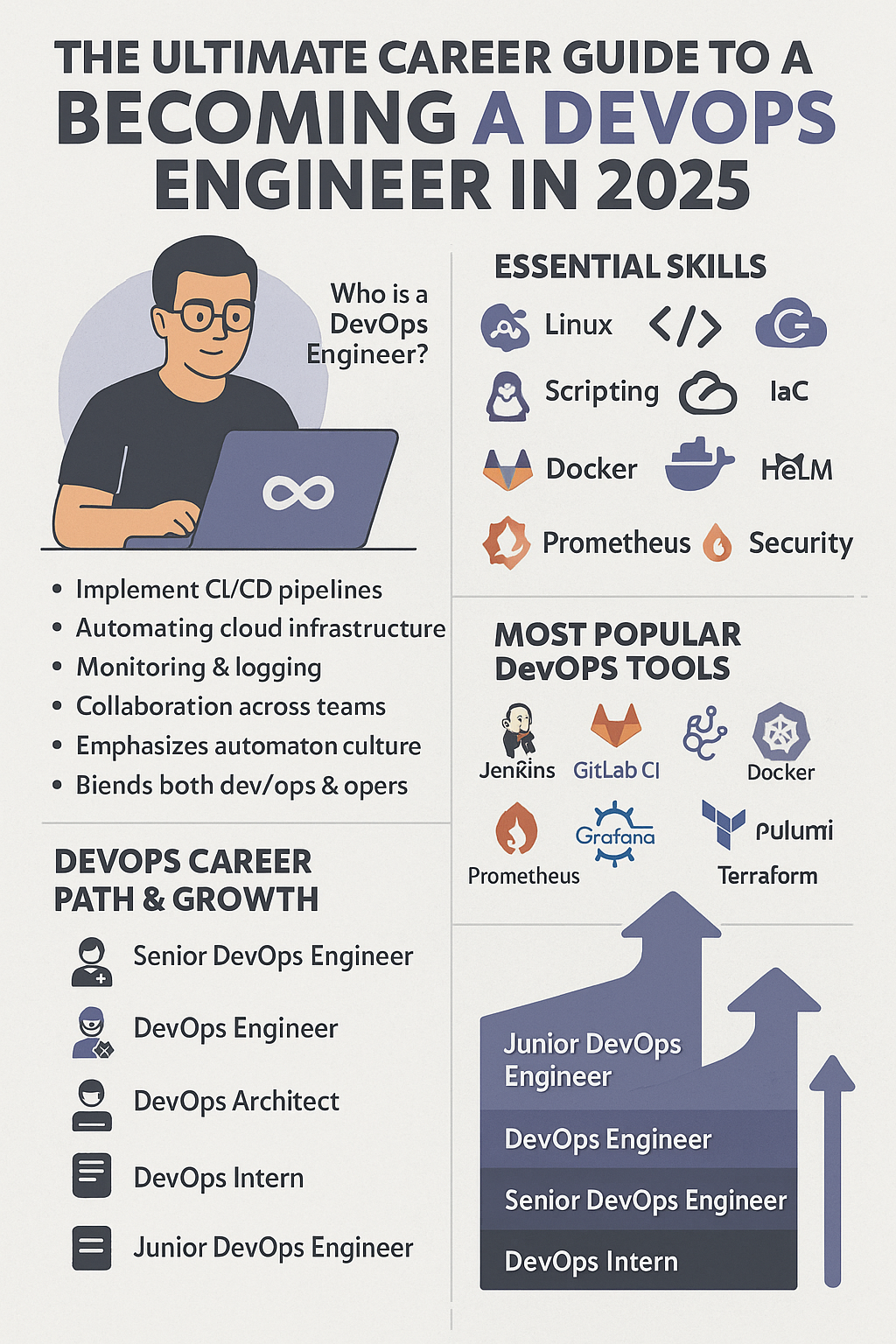
Who is a DevOps Engineer?
A DevOps Engineer bridges the gap between developers and IT operations. They implement automation across the software lifecycle—from code integration to production deployment. A successful DevOps engineer wears many hats: coder, infrastructure manager, security enforcer, and deployment strategist.
Why Choose DevOps in 2025?
 Global Demand: DevOps is one of the most in-demand IT roles.
 Versatile Skillset: Apply across development, cloud, security, and SRE roles.
 High Salaries: Average DevOps salaries exceed $100K globally.
 Tool Variety: Work with cutting-edge tools and practices.
 Work Flexibility: Remote jobs and freelance contracts are abundant.
Core Responsibilities of DevOps Engineers
- Automating build and deployment pipelines (CI/CD)
- Managing infrastructure using code (IaC)
- Monitoring system health and app performance
- Ensuring security in deployments (DevSecOps)
- Collaborating across development, QA, and IT
Essential Skills for DevOps Engineers
- Operating Systems: Linux and Windows command-line mastery
- Scripting: Bash, Python, Groovy for automation tasks
- Version Control: Git and branching strategies
- Cloud Computing: AWS, Azure, GCP
- CI/CD Pipelines: Jenkins, GitLab CI, GitHub Actions
- Containerization: Docker and Kubernetes
- Monitoring & Observability: Prometheus, Grafana, ELK Stack
- Networking & Security: SSL, firewalls, IAM, VPCs
Most Popular DevOps Tools in 2025
| Category | Tools |
|---|---|
| CI/CD | Jenkins, GitHub Actions, GitLab CI, CircleCI |
| Containerization | Docker, Podman |
| Orchestration | Kubernetes, Helm, OpenShift |
| Infrastructure as Code | Terraform, Ansible, Pulumi, CloudFormation |
| Monitoring | Prometheus, Grafana, Datadog, New Relic, ELK Stack |
| Version Control | Git, GitHub, Bitbucket, GitLab |
Programming and Scripting for DevOps
- Bash/Shell – For scripting deployments and server tasks
- Python – Automation scripts, DevOps utilities
- Groovy – Used in Jenkins pipelines
- YAML – Declarative format for Kubernetes, GitHub Actions
- JSON – API and configuration management
Cloud Platforms Every DevOps Must Know
- AWS: Most adopted, offers EC2, S3, ECS, Lambda
- Azure: Popular in enterprise and .NET-heavy stacks
- Google Cloud: Preferred for AI/ML workloads
- Hybrid/Multi-cloud: Skills in managing cross-cloud workloads is a plus
CI/CD Tools You Should Master
- Jenkins – The classic open-source CI/CD tool
- GitHub Actions – Popular for developers and integration with GitHub
- GitLab CI – Built-in CI/CD pipelines with GitLab
- CircleCI – Cloud-native CI/CD with fast build times
- Azure DevOps – Excellent for end-to-end Azure integrations
Infrastructure as Code (IaC) Tools
IaC allows you to automate the setup of environments:
- Terraform – Cloud-agnostic and declarative
- Ansible – Ideal for configuration management
- Pulumi – Supports real languages like Python, JS
- AWS CloudFormation – AWS-native IaC solution
Monitoring and Logging Tools
- Prometheus + Grafana – Open-source powerhouse for metrics
- ELK Stack (Elasticsearch, Logstash, Kibana) – Centralized logging and analytics
- Datadog / New Relic – Full observability platforms with AI alerting
Containers & Orchestration
- Docker: Build and manage containerized applications.
- Kubernetes: Industry standard for orchestrating containers.
- Helm: Kubernetes package manager.
- OpenShift: Red Hat’s Kubernetes platform with security layers.
DevOps Career Path & Growth
| Level | Title |
|---|---|
| Entry-Level | DevOps Intern / Junior DevOps |
| Mid-Level | DevOps Engineer / SRE |
| Senior-Level | Senior DevOps / DevSecOps Lead |
| Advanced | Platform Engineer / Cloud Engineer |
| Expert | DevOps Architect / Engineering Manager |
DevOps Certifications in 2025
- AWS Certified DevOps Engineer
- Certified Kubernetes Administrator (CKA)
- Azure DevOps Engineer Expert
- Docker Certified Associate
- HashiCorp Certified: Terraform Associate
- Google Professional DevOps Engineer
Remote Work and Freelancing in DevOps
DevOps is perfect for remote work—everything is scriptable, accessible via SSH, or managed in the cloud. Platforms like Toptal, Upwork, and LinkedIn offer freelance gigs ranging from CI/CD builds to full-stack automation.
Top Industries Hiring DevOps Engineers
- SaaS (Software as a Service)
- Finance and Banking (DevSecOps demand)
- eCommerce & Logistics
- Government and Defense
- AI/ML Infrastructure startups
Best Practices for Succeeding in DevOps
- Automate everything: From deployments to alerts.
- Think security-first: Secure secrets, pipelines, and APIs.
- Version control everything: Infrastructure, scripts, and docs.
- Measure and observe: Metrics-driven decisions are key.
- Keep learning: Tools evolve—so should your skills.
Conclusion
The future of DevOps is bright, automated, and cloud-native. It offers one of the most versatile, well-compensated, and impactful roles in the tech industry. Whether you’re coming from development, sysadmin, or QA, mastering DevOps in 2025 puts you at the heart of modern software engineering.
FAQs
- Is coding mandatory for DevOps?
Basic scripting (Bash, Python) is essential. Deep programming is optional. - Which cloud platform is best for DevOps?
AWS leads the market, but Azure and GCP are valuable too. - Do DevOps engineers need Kubernetes?
Yes—Kubernetes is widely adopted and often a job requirement. - Is DevOps suitable for beginners?
Yes, start with Linux, Git, scripting, and slowly add tools like Docker and Jenkins. - How long does it take to become a DevOps engineer?
With consistent learning, 6–12 months can land you an entry-level role. - Is DevOps a stressful job?
Not inherently. Automation, good tooling, and alerting reduce stress over time.
Introduction
The role of the Software Development Engineer in Test (SDET) has become one of the most dynamic and in-demand careers in tech. With the rise of DevOps, continuous testing, and automated delivery, companies are now seeking professionals who can both write code and ensure its quality. If you’re exploring a future-proof career that blends software engineering with quality assurance, SDET might be the perfect choice.
Who is an SDET?
An SDET is a professional who is proficient in both software development and testing. Unlike traditional QA engineers who primarily focus on manual testing, SDETs design, develop, and maintain automation frameworks, write code, build CI/CD pipelines, and contribute to the software’s testability and scalability from day one.
They are software engineers at heart but with a passion for ensuring product quality.
Why Choose an SDET Career in 2025?
 High demand in Agile and DevOps environments
 Lucrative salaries with full-stack skill expectations
 Remote and global work opportunities
 Career progression to leadership and architect roles
- Balance of creativity and logical problem-solving
As companies ship faster, they need testing to keep up. That’s where SDETs shine.
Key Responsibilities of an SDET
- Building and maintaining automated test frameworks
- Creating test plans and test cases
- Writing automation scripts for UI, API, and performance tests
- Collaborating with developers in agile teams
- Maintaining test data, mocks, and test environments
- Ensuring CI/CD test pipelines are stable and efficient
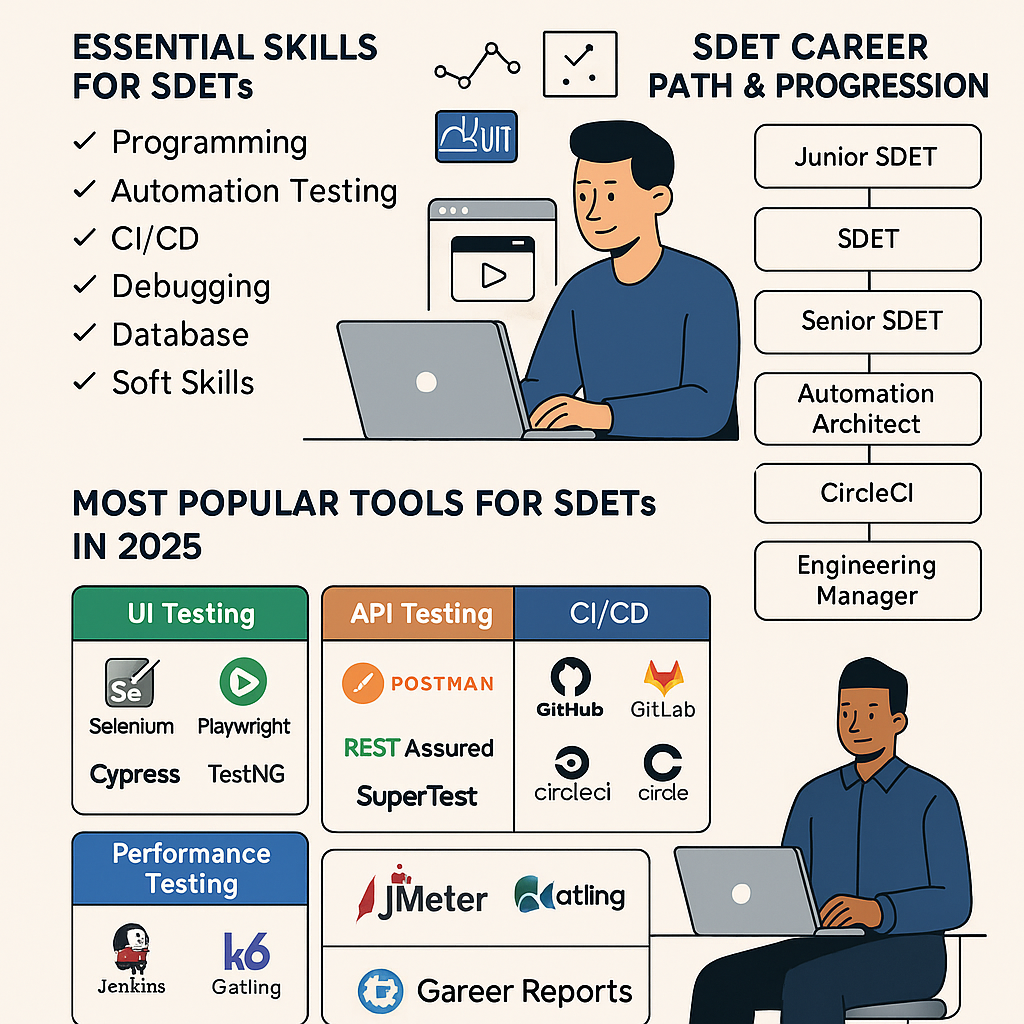
Essential Skills for SDETs
- Programming: Proficiency in Java, Python, or JavaScript
- Test Automation: Selenium, Playwright, Cypress
- CI/CD: Jenkins, GitHub Actions
- API Testing: Postman, REST Assured
- Database: SQL, NoSQL (MongoDB, PostgreSQL)
- Version Control: Git, GitHub
- Debugging: Reading logs, stack traces
- Soft Skills: Communication, documentation, teamwork
Most Popular Tools for SDETs in 2025
| Category | Tools |
|---|---|
| UI Testing | Selenium, Playwright, Cypress |
| API Testing | Postman, REST Assured, SuperTest |
| CI/CD Integration | Jenkins, GitLab CI, CircleCI, GitHub Actions |
| Test Management | TestRail, Xray, Zephyr |
| Performance Testing | JMeter, k6, Gatling |
| Reporting | Allure, Extent Reports, ReportPortal |
Automation Frameworks Every SDET Must Know
- Selenium WebDriver – Legacy but still widely used.
- Playwright – For modern, multi-browser E2E testing.
- Cypress – Easy-to-use framework focused on frontend testing.
- TestNG / JUnit – Popular in Java-based test suites.
- Cucumber (BDD) – For behavior-driven testing using Gherkin syntax.
Programming Languages for SDETs
- Java – Most common in large enterprises and TestNG environments.
- Python – Ideal for API testing and quick prototyping.
- JavaScript/TypeScript – Dominates frontend automation (Cypress, Playwright).
- C# – Used in .NET environments (with NUnit or MSTest).
Version Control and Collaboration Tools
- Git/GitHub – For source control and pull requests.
- Bitbucket/GitLab – Alternate version control with integrated CI/CD.
- JIRA – Managing test cases and bugs in Agile workflows.
Continuous Integration Tools
Automate test execution with:
- Jenkins – Widely adopted open-source tool.
- GitHub Actions – Modern and easy-to-integrate workflows.
- GitLab CI – Built-in CI/CD with GitLab projects.
- CircleCI – Cloud-native CI with fast builds.
Database and API Testing Tools
- Postman – Popular GUI for testing REST APIs.
- REST Assured – Java-based library for automated API tests.
- SQL – Must-know language for querying databases during validation.
- DBUnit – For testing database-driven apps.
Performance and Load Testing Tools
- Apache JMeter – Classic tool for simulating user loads.
- k6 – Developer-friendly, scriptable load testing.
- Gatling – High-performance tool, great for real-time analytics.
SDET Career Path & Progression
| Level | Role |
|---|---|
| Entry-Level | Junior QA / Automation Tester |
| Mid-Level | SDET / Test Automation Engineer |
| Senior-Level | Sr. SDET / QA Lead |
| Advanced | Automation Architect |
| Executive | QA Manager / Director of QA |
With experience, SDETs can also transition into DevOps, Product, or Engineering Leadership roles.
Certifications for SDETs
- ISTQB Foundation Level
- Certified Selenium Professional
- Certified Agile Tester
- AWS Certified Cloud Practitioner
- Microsoft Azure Fundamentals
Top Industries Hiring SDETs in 2025
- FinTech – Secure, scalable apps need rigorous testing.
- Healthcare – Compliance and reliability are mission-critical.
- eCommerce – User experience is everything.
- EdTech – Scaling educational platforms with automation.
- AI & SaaS Startups – Fast development needs automated coverage.
Freelancing and Remote Work as an SDET
Thanks to tools like GitHub, Jira, and Slack, remote SDET jobs are booming. Freelancers can find contract work on platforms like Upwork, Toptal, and Fiverr, often commanding premium rates with automation skills.
Conclusion
The SDET role is more than just automation—it’s a fusion of development, quality, and delivery excellence. Whether you’re a developer transitioning into QA, or a manual tester upskilling into automation, now is the best time to pursue a career as an SDET.
FAQs
- What’s the difference between QA and SDET?
QA focuses on testing manually, while SDETs write code and build automated frameworks. - Is coding mandatory for SDET roles?
Yes, strong coding skills are essential for automation and scripting. - Which is the best language for SDET?
Java is widely used, but Python and JavaScript are growing in popularity. - Do SDETs only write tests?
No. SDETs also architect test systems, integrate CI/CD, and ensure test data and infrastructure are robust. - Are SDET jobs remote-friendly?
Absolutely. Many companies offer full-remote and freelance SDET opportunities. - How to become an SDET with no experience?
Learn a programming language, master an automation tool, build a GitHub portfolio, and start applying!

Introduction
In the rapidly evolving world of web development, ensuring the reliability of your application across multiple browsers and platforms is critical. This is where Playwright shines. Developed by Microsoft, Playwright is a cutting-edge end-to-end testing framework that enables fast, reliable, and scalable automation for web apps. Whether you’re testing modern single-page applications (SPAs) or legacy sites, Playwright offers unmatched flexibility and developer ergonomics.
What is Playwright?
Playwright is an open-source Node.js library that allows developers to automate Chromium, Firefox, and WebKit browsers using a single API. Created by the same team that worked on Puppeteer at Google, Playwright extends functionality by supporting multiple browsers, robust debugging tools, and network interception, making it ideal for testing in CI environments.
Key Features of Playwright
Playwright boasts a range of powerful features that make it stand out:
- Multi-Browser Support: Test across Chromium (Chrome, Edge), Firefox, and WebKit (Safari).
- Parallel Test Execution: Run tests concurrently to speed up suite performance.
- Headless and Headful Modes: Run UI tests without opening the browser.
- Auto-Wait: Intelligent waiting ensures elements are ready before interaction.
- Network Interception: Mock APIs and control request/response behavior.
- Screenshots & Videos: Capture UI during test execution for visual debugging.
- Code Generation: Generate scripts by recording user interactions.
Playwright vs. Selenium vs. Cypress
| Feature | Playwright | Selenium | Cypress |
|---|---|---|---|
| Multi-browser Support | Chromium, Firefox, WebKit | All major browsers | Only Chromium-based |
| Native Async/Await API | Yes | No (callbacks) | Yes |
| Headless Mode | Yes | Yes | Yes |
| Network Interception | Built-in | Requires workarounds | Yes |
| Speed | Very Fast |  Slower Slower |  Fast Fast |
Playwright combines the strengths of both Selenium’s flexibility and Cypress’s developer-friendliness, while offering a broader browser range.
Installation and Setup Guide
To install Playwright, simply run:
npm init playwright@latest
This will set up everything you need: dependencies, example tests, and browser binaries. For TypeScript users, Playwright provides first-class support with auto-generated types.
Basic Syntax and Concepts
Playwright revolves around a few core concepts:
- Browser Context: Like an incognito browser instance.
- Page: Represents a browser tab.
- Locator: Selects elements with smart waiting.
- Test Runner: Built-in runner to define
test()blocks.
Example:
test('Login test', async ({ page }) => {
  await page.goto('https://example.com/login');
  await page.fill('#username', 'admin');
  await page.fill('#password', 'password');
  await page.click('text=Login');
  await expect(page).toHaveURL('/dashboard');
});
Cross-Browser Testing Made Easy
With just one command, you can run the same test across all supported browsers:
npx playwright test --project=firefox
Or define multiple projects in your playwright.config.ts to run everything simultaneously.
Headless and Headful Modes
Playwright defaults to headless mode (no UI), but if you want to visually inspect a test:
npx playwright test --headed
Headful mode is excellent for debugging local issues.
API Testing with Playwright
Playwright also supports backend/API testing using the request API:
const request = await playwright.request.newContext();
const response = await request.post('/api/login', {
  data: { username: 'admin', password: '1234' },
});
expect(response.ok()).toBeTruthy();
This makes Playwright a one-stop shop for both UI and API automation.
Visual Regression Testing
Catch visual bugs by taking screenshots and comparing them:
await expect(page).toHaveScreenshot('dashboard.png');
This is incredibly useful for detecting layout shifts or theme issues.
CI/CD Integration
Playwright works out-of-the-box with GitHub Actions:
- name: Run Playwright tests
  run: npx playwright test
It also supports other CI tools like Jenkins, CircleCI, and GitLab CI.
Handling Authentication and Sessions
Save time by skipping repetitive login steps:
npx playwright codegen https://app.com/login
Save state with:
await page.context().storageState({ path: 'auth.json' });
Restore sessions in future tests to improve speed.
Best Practices for Test Maintenance
- Use Page Object Model (POM) to organize code.
- Add retry logic to handle flaky tests.
- Keep tests atomic and independent.
- Use fixtures to manage setup/teardown.
Debugging Techniques
- Use
npx playwright codegento record flows. - Add
--trace onto collect trace files for test runs. - Use
.pause()and.debug()during development.
Playwright with TypeScript
Thanks to type support, using Playwright with TypeScript enhances auto-completion, validation, and developer confidence:
npm i -D typescript ts-node
Update playwright.config.ts for TypeScript-specific options.
Conclusion
Playwright is redefining the way developers approach test automation. From blazing-fast execution to rich debugging tools and multi-browser support, it’s no surprise that Playwright is gaining adoption across startups and enterprises alike. Whether you’re writing your first test or building an enterprise-grade suite, Playwright is the framework to master in 2025.
FAQs
- Is Playwright better than Selenium?
For modern web apps, yes. Playwright offers faster performance, built-in wait handling, and better developer tools. - Can Playwright test mobile apps?
Not directly. It can simulate mobile browsers but not native apps. - Does Playwright support parallel testing?
Yes, it runs tests in parallel across multiple threads and browsers. - What languages are supported?
Playwright officially supports JavaScript, TypeScript, Python, C#, and Java. - Can I use Playwright with Docker?
Absolutely. Playwright provides Docker images for isolated test environments. - Is Playwright suitable for large enterprise projects?
Yes, it supports scalable test architectures and integrates with major CI/CD platforms.
]]>